
iPhone Screenshots


Description
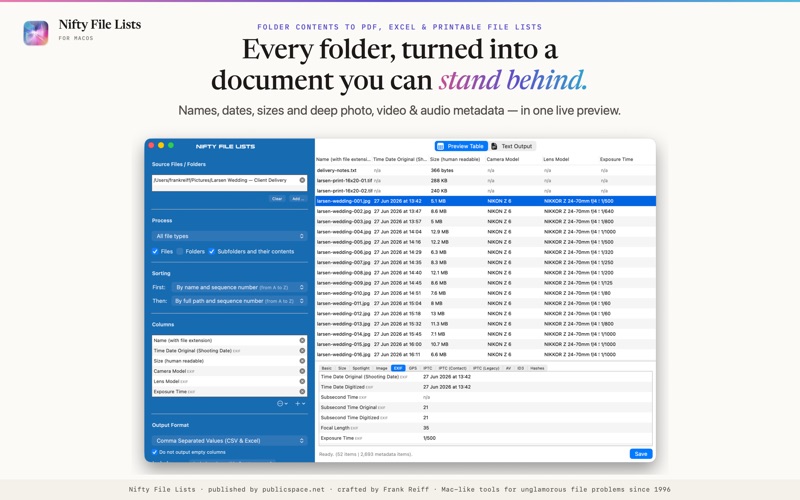
Nifty File Lists turns the contents of any folder into a finished document: a paginated PDF manifest, an Excel-ready spreadsheet, or a printable file list — complete with names, dates, sizes and deep photo, video & audio metadata. Print a list of the files in a folder, save folder contents as a PDF, or export a directory listing to Excel — natively on your Mac. Nothing ever leaves it.
HAND OVER A MANIFEST, NOT A SCREENSHOT
Deliverables for a client, a file list for legal discovery, an audit record, an insurance inventory: save a paginated PDF that documents exactly what is in the folder. Every manifest carries a provenance stamp — the source folder, the number of files and columns, and the date the list was generated — plus a title page, repeating column headers on every page and continuous "Page X of Y" numbering. A live preview shows the finished PDF while you fine-tune.
NOTHING IS EVER SILENTLY DROPPED
Export fifty columns and you get fifty columns. If they don't fit the page, Nifty File Lists narrows them intelligently, then steps the font down, and — only if the table is still too wide — splits it into sequential tables, repeating your identifying columns on each one so every row stays traceable. Long paths wrap; they don't disappear.
FROM FOLDER TO EXCEL IN ONE STEP
CSV and tab-separated exports open cleanly in Excel, Numbers, statistics packages and databases — no re-parsing, no mangled dates. Or copy the finished table to the clipboard and paste it straight into an open spreadsheet. Empty columns are left out automatically, so you start with data, not clutter.
PRINT IT, FILE IT, ARCHIVE IT
Print a list of files in any folder — the thing the Finder still can't do. Neatly aligned plain-text listings with right-aligned numbers and a ruled header, or print-ready PDFs in A4, US Letter or Legal, portrait or landscape, with hairline, grid or zebra table styles that stay readable in black-and-white.
NOT JUST NAMES AND DATES
Beyond names, paths, sizes and every timestamp your Mac tracks, Nifty File Lists extracts metadata in depth: document titles, authors and copyright; photo capture date, camera, lens, exposure, ISO and GPS position; audio and video codecs, sample rates and durations; MD5 and SHA checksums that let the recipient verify a handoff file by file. Pick exactly the columns you want, arrange them in any order, and save your favourite combinations as column sets you can recall with one click.
CATALOG A PHOTO OR MUSIC LIBRARY
Collections sprawl across drives, backups and archives. Build a catalog of what lives where: which photos were shot with which lens and when, which masters are uncompressed, which files moved to the archive drive. Filter the scan to just images, video, audio or documents, and export the catalog in whatever format your workflow needs.
EIGHT OUTPUT FORMATS
PDF manifest · plain text (aligned or delimited) · CSV · TSV · Excel and Numbers via the clipboard · styled, dark-mode-aware HTML · Markdown table · JSON for scripts and developer handoffs.
PRIVATE BY DESIGN, BUILT FOR SCALE
Your files and file lists never leave your Mac — no cloud, no accounts, no telemetry. A multi-threaded engine handles folders of hundreds of thousands of files, and the interactive preview fills in while extraction is still running. Native on Apple Silicon and Intel.
Nifty File Lists is made by publicspace.net, creators of professional Mac file management and productivity tools since 1996.