
iPhone Screenshots



Description
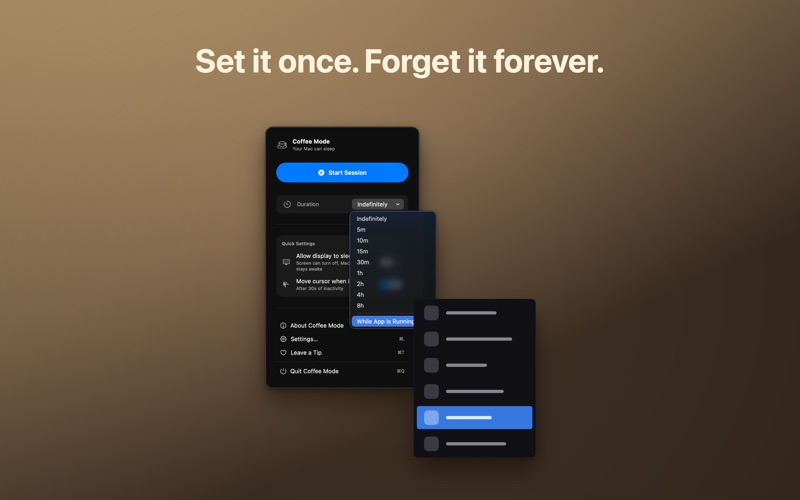
Coffee Mode keeps your Mac — and its display — awake for as long as you want. It lives quietly in your menu bar: one click to start, one to stop. No tracking, no clutter.
That's the whole job, and it needs no permission at all. Everything else is optional: Coffee Mode can also assist you in a few extra ways — but you're free to leave all of that off and use it purely as a keep-awake app.
FEATURES
• Keep-awake session that prevents your Mac and display from sleeping, with a duration you pick: indefinite, 5 minutes, or up to 8 hours
• Scheduled sessions: start and/or end at a time you choose
• Quick Settings: allow the display to sleep
ACCESSIBILITY (optional) - assistive tools for anyone who can move the pointer but can't reliably press a mouse or trackpad button (hand tremor, RSI, limited mobility). Inspired by macOS Mouse Keys and Dwell. Every one is off by default, and you can ignore them entirely. Each uses a shortcut you can customize:
• Click with the keyboard: a shortcut performs a click wherever the pointer is
• Double-click with the keyboard: a shortcut performs a full double-click
• Dwell Click: clicks automatically after you hold the pointer still - no button, no keys
• Find the pointer: a shortcut flashes a ring around the pointer, easy to spot on large screens
• Optional notifications with custom sounds and instant preview
• Statistics: total time kept awake, average session length, and session count
• Launch at login (off by default - you turn it on when you want)
• 10 menu bar icons and a light/dark theme
• Fully accessible: VoiceOver, Dynamic Type, Reduce Motion
• Fully sandboxed - the keep-awake feature needs no permission. The accessibility tools are off by default; if you turn one on, macOS asks for the Accessibility permission it requires
Enjoying it? A friendly tip jar lets you support development - the app stays free and fully functional without it.