
Photo to Watercolor Waterbrush
Edit photos and videos into paintings
Digital Masterpieces GmbH
iPhone Screenshots






Description
Edit photos and videos into paintings using 31 presets and 12 professional tools. Apply AI-generated effects with machine learning assistance. Adjust colors, brushes, and textures for custom artwork. Export edited media in various formats.
Turn your photos and videos into luminous, vivid watercolor paintings — art so beautiful, it belongs in a gallery.
Waterbrush transforms your images into stunning watercolor artwork — right on your iPhone, iPad, or Mac. Whether you're capturing a travel memory, a family portrait, or an everyday moment, Waterbrush brings the soft glow and delicate flow of traditional watercolors to your fingertips. Your images stay 100% private. Everything is processed directly on your device for instant results and complete peace of mind. No internet required.
◆ Photos and Videos — Both Transformed
Export up to 4K resolution at 60 FPS for stunning video productions, or go for an artistic stop-motion look. For photos, export up to 64 megapixels — perfect for large-format prints, canvas art, journal covers, or even T-shirt designs.
◆ 31 Curated Watercolor Styles
Every style captures the essence of traditional watercolor painting. Find the perfect look for portraits, landscapes, travel photos, or daily snapshots — then make it your own. With Custom Styles, personalize and save your own presets — synced across all your devices.
◆ Precise Editing Tools
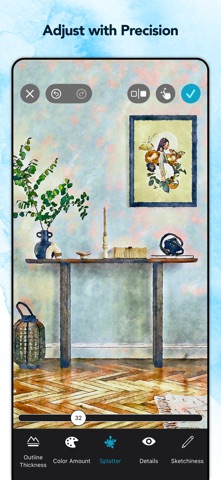
Take full control of your artwork. Fine-tune every detail with pixel-level accuracy — using your finger or Apple Pencil — directly in real time. Adjust wetness, wobbling, splatter, outlines, and more. Remove imperfections with the Magic Eraser, or add your personal signature to mark your creations as truly yours.
◆ Projects — Your Creative Work, Always Saved
Never lose a creative idea in progress. Save your edits as a project and return at any time — right where you left off. Explore variations, experiment freely, and share your projects with others.
◆ Paper, Color & Finish
Complete your artwork with authentic finishing touches:
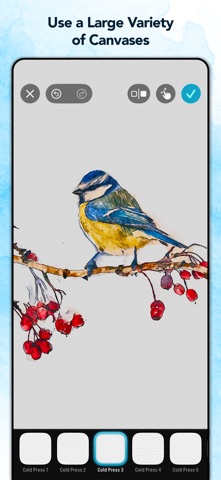
• 22 fine-art paper textures for a realistic, tactile feel
• 44 color palettes to set the perfect mood
• 30 customizable vignettes to frame your art
Every detail contributes to a finished piece that looks and feels like traditional watercolor art.
◆ Print & Share Your Creations
Bring your watercolors into the real world:
• Postcards via MyPostcard — worldwide delivery
• Canvas prints and posters via CanvasPop with a 100% "Love It" guarantee
• Large-format prints, made possible by Waterbrush's ultra-high-resolution output
Share your finished pieces on Instagram, TikTok, YouTube, and Facebook.
Download Waterbrush for free and start creating watercolor art that feels truly yours.
◆ Key Features
• Transform photos into high-resolution* watercolor paintings (up to 64 MP)
• Transform videos into stunning watercolor animations (up to 4K)
• 31 hand-curated watercolor styles
• Fully adjustable effects—fine-tune every detail*
• Pixel-precise retouch tools with finger or Apple Pencil*
• Magic Eraser to remove unwanted elements*
• Fine-art paper and canvas textures for authentic finishes*
• Color filters and custom vignettes*
• Add your personal signature or logo to your artwork*
• Personalize and save your own Custom Styles
• Projects — save your work, explore variations and share with others
• Real-time, on-device processing — no uploads, no waiting, no internet needed. 100% privacy assured
• Integrated postcard and canvas printing services
• Full RAW support for iPhone and DSLR images
• Optimized for iOS 26, iPhone 17 & iPhone 17 Pro
* Subscribe to unlock all features.
◆ Waterbrush Premium
To unlock Waterbrush's full creative power, we offer weekly, monthly, and yearly Premium auto-renewing subscriptions.
Payment is charged to your credit card through your Apple account at confirmation of purchase. Subscription renews automatically unless you turn off auto-renewal in Apple account settings or cancel your subscription at least 24 hours prior to the end of the subscription period.
◆ Support
Questions or feedback? We're here 24/7.
Contact us at: [email protected]
Terms of Use: https://www.digitalmasterpieces.com/app-terms-of-use/