
iPhone Screenshots




Description
Your Downloads folder is where files go to be forgotten. Tidi files them for you — one click, entirely on your Mac, and every move can be undone.
ONE CLICK AND DOWNLOADS IS EMPTY
Press Tidi Now. Tidi looks at each file, matches it against your rules, and moves it where it belongs. Five rules are ready the moment you open the app:
• Receipts and invoices → Documents/Receipts & Taxes
• Screenshots → Pictures/Screenshots
• Installers and disk images (.dmg, .pkg, .iso) → Archives & Installers
• Archives (.zip, .tar, .gz, .rar, .7z) → Archives & Installers
• Code and config files → Documents/Code & Projects
IT READS THE FILE, NOT JUST THE FILENAME
"Screenshot 2026-03-14 at 11.42.08.png" tells you nothing. Tidi uses Apple's on-device Vision framework to read the text inside your images, so a receipt is filed as a receipt even when its name never says so. That text is used to pick a folder and then discarded — it is never written to disk and never leaves your Mac.
EVERY MOVE IS REVERSIBLE
Press ⌘Z. Every move is written to an atomic transaction journal before it happens, so files return to the exact folder they came from — including moves from a scheduled run you weren't watching. A toast with an Undo button appears for ten seconds after every action, and the full history stays available after that.
RULES IN PLAIN ENGLISH
Type "move receipts and invoices to Documents/Receipts" and Tidi builds the rule. Or set the conditions yourself: extension, name, size, age, category, or text found inside the file.
QUICKDROP
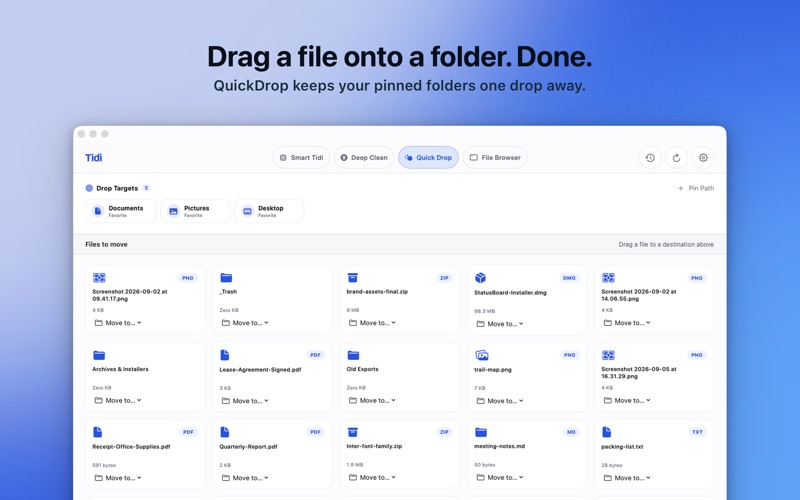
A shelf of your pinned folders sits above every tab. Drag a file onto a chip and Tidi files it, with the same undo as everything else. That shelf is free. Tidi Pro turns it into a workspace: everything still waiting to be filed laid out as cards with its size and kind, and a one-tap button on each to send it where it goes.
DEEP CLEAN
Finds the .dmg and .pkg installers still sitting in your Downloads for apps you already installed, shows what each one is costing you in disk space, and scores how confident it is. Anything belonging to a running app is locked out, and nothing is removed that you did not select.
A REAL FILE BROWSER
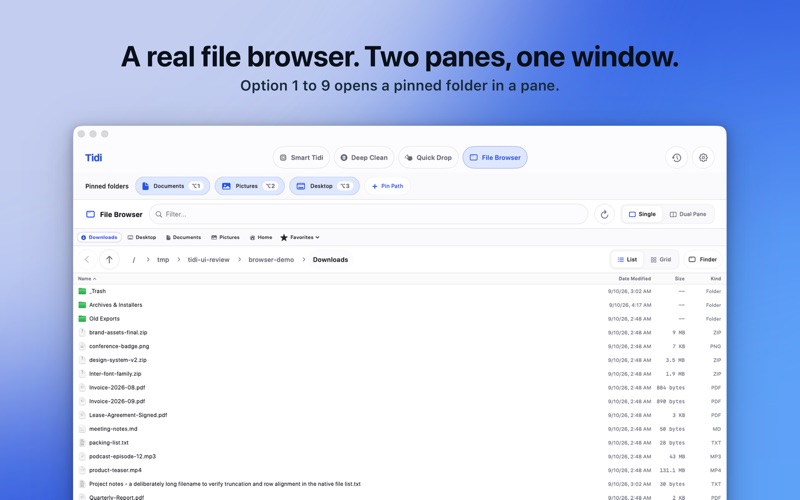
Two panes at a true 50/50, each with its own quick locations. Press ⌥ 1 through ⌥ 9 to open a pinned folder straight into a pane. Drag between them, or right-click and Move to Other Pane. Quick Look with Space. Prefer one pane? It is a toggle.
ON A SCHEDULE, IF YOU WANT ONE
Hourly, daily, weekly, or at login. It runs quietly and keeps a count of what it sorted.
PRIVATE BECAUSE THERE IS NOTHING TO SEND
Tidi contains no networking code at all. No analytics, no crash-reporting SDK, no server, no account, nothing to opt out of. It runs in Apple's App Sandbox and only ever touches the folders you have granted it.
FREE, WITH A ONE-TIME UNLOCK
Tidi is free to download and free to keep: one-click sorting of your Downloads folder, the pinned-folder shelf, and full undo. Tidi Pro is a single purchase — never a subscription — that adds sorting beyond Downloads, custom and plain-English rules, scheduling, the QuickDrop workspace, Deep Clean, and the dual-pane browser. A free 14-day trial is there if you would rather try it first, and if you bought Tidi before, Pro is already yours.
Requires macOS 14 Sonoma or later.