
Cisdem PDFMaster
Edit PDFs, convert files, merge documents
ENOL INTERNATIONAL CO., LIMITED
iPhone Screenshots




Description
Edit PDF files by adding text, annotations, and comments. Convert PDF to Word, PowerPoint, Pages, Keynote, Text, ePub, HTML, and images. Extract images in JPEG, PNG, BMP, GIF, or TIFF format. Merge, split, compress, encrypt, and decrypt PDF files.
Cisdem PDFMaster is a multi-functional PDF solution to convert, create, edit, merge, split, compress, encrypt and decrypt PDF files on your Mac, it offers a straightforward and efficient workflow you need for basically any task involving PDF.
KEY FEATURES
√ Convert PDF
- Convert PDF to Word, PowerPoint, Pages, Keynote, Text, Rtfd, ePub, HTML and images.
- Extract images in JPEG, PNG, BMP, GIF or TIFF format from the PDF file.
- Converted documents retain texts, images, tables elements, and keep the original formatting, layout.
- Batch convert PDF files into other file formats.
- Convert the entire document or partially convert specific pages of a PDF.
√ Create PDF
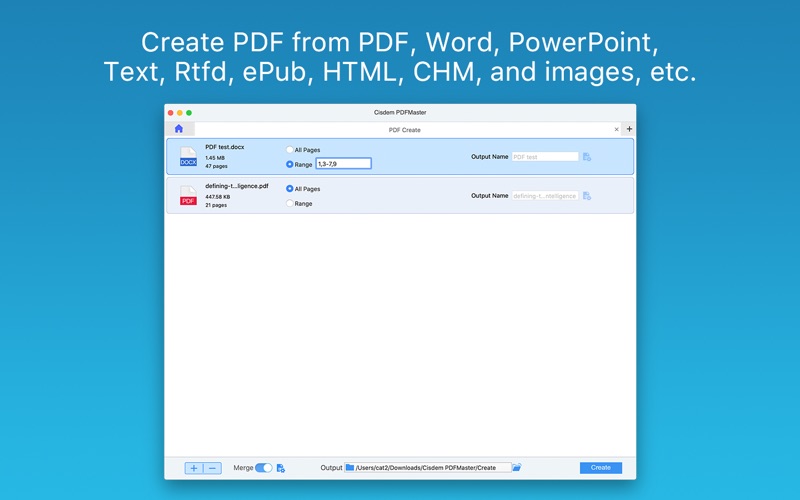
- Create professional-looking PDF from many file extensions: PDF, Word, PowerPoint, Text, Rtfd, ePub, HTML, CHM and images.
- Batch create PDF files from multiple files and file types.
- Create PDF from specific pages or page range of a document.
- Create a single PDF file by merging multiple file types.
- Set password, size and quality for the output PDF.
√ Edit PDF
- Highlight, underline or strikethrough text for easy PDF review and annotating.
- Markup and comment tools, including shapes, text, pencil, notes.
- Add stamp from a list of predefined templates to PDF.
- Sign PDF documents with your own handwriting.
- Crop the part of the PDF page you want.
√ Merge and Split PDF
- Merge multiple PDF files into one single PDF.
- Split PDF files by equal page quantity or by specific page range.
- Display thumbnails of each PDF page, you can easily delete, rotate and reorder PDF pages.
√ Compress PDF
- 4 compression levels: Small File Size, Medium File Size, Large File Size and Custom.
- Real-time calculate the size of compressed PDF.
- Batch compress PDF files.
√ Encrypt and Decrypt PDF
- Set open password to protect PDFs from unauthorized opening.
- Set owner password to prevent unauthorized printing, editing, and copying of your PDF.
- Remove restrictions on PDF opening, printing, editing, and copying.
- Batch encrypt or decrypt PDF files.
√ Others
- Ultra-fast process speed.
- Simple and clear interface.
- Flexible switching between different PDF function modules.
- Quick access to frequently opened PDF files with recent files list.
SUPPORT
If you have any questions about Cisdem PDFMaster, please directly visit https://www.cisdem.com/support.html, or contact us at [email protected]