
OK Alarm: Holiday & Shift Work
Set alarms for shifts, holidays, and personal
志聪 黄
iPhone Screenshots



Description
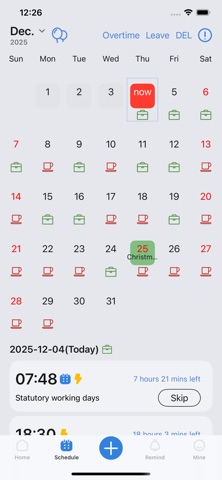
Set alarms for specific dates, holidays, and custom schedules. Track rotations with one alarm. Adjust settings for overtime and leave days. Receive notifications for upcoming events and deadlines.
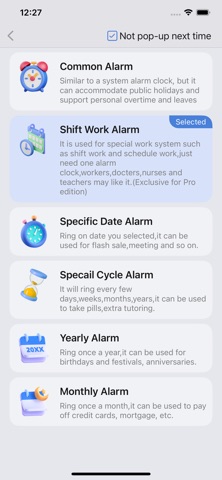
Supports multiple functions such as shift schedules, holidays, specific dates, and time reporting, meeting various needs in work and daily life:
● Common Alarm Clock:
Flexibly adapts to official holidays, while supporting personalized scheduling for overtime days and leaves.
● Shift Alarm Clock:
A boon for shift workers, requiring just one alarm to handle rotating schedules effortlessly.
● Specific Date Alarm Clock:
Set reminders for specific dates, whether it's for snagging limited-time deals or renewing your driver's license.
● Monthly Alarm Clock:
Set it once and get monthly reminders for tasks like credit card payments, rent, and more – even on specific weekdays of the month.
● Yearly Alarm Clock:
Customized alerts for birthdays and anniversaries, ensuring you never miss those significant moments.
● Custom Recurring Alarm Clock:
Stay on track with periodic reminders, perfect for events that repeat every year, month, week, or specific number of days, such as a 5.5-day work week.
Featured Highlights:
◆Personalized Alarm Tones: Beyond our selection of 20 preset tones, craft your unique alarm sound using our integrated tone creator.
◆Flexible Controls: Choose to snooze, silence, or postpone alarms with a simple tap.
◆Water & Medication Reminder.
◆Time Announcements: iOS 13 and above users can tailor time announcements, keeping you aware of every passing moment.
◆Dark and Light Modes: Seamlessly adapts to your system theme, providing a comfortable nighttime experience.
◆Widget Support: Get a quick view of upcoming alarms right on your home screen.
【Automatic Renewal Instructions】
The Pro edition is an automatic renewal product,which will be charged from your Apple iTunes account upon confirmation of purchase and automatically renewed 24 hours before your one-year subscription period expires. To cancel the automatic renewal, please manually turn off the automatic renewal in the App Store account Settings 24 hours before the subscription expires. After the automatic renewal is turned off, the fee will not be deducted.
Automatic Subscription to Professional Service Agreements
https://www.flytiger.work/iOSProtocol.html
Privacy Policy
https://www.flytiger.work/iOSPrivacy.html