
Manage time every 30 minutes
Schedule tasks and set reminders
Kazuya Fujita
iPhone Screenshots
Description
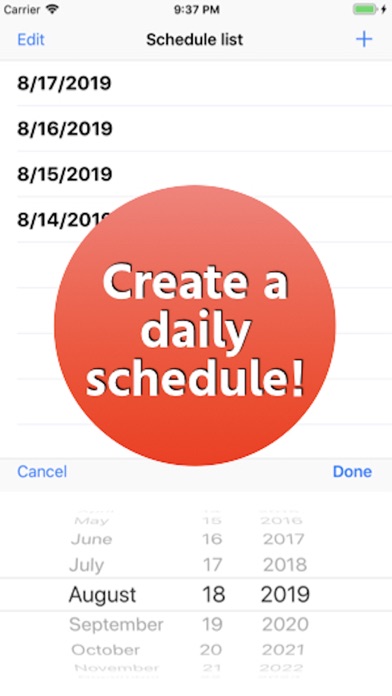
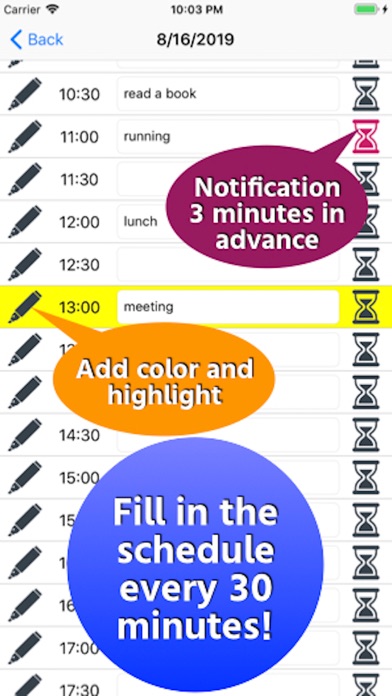
Schedule tasks by selecting a date and setting specific times in 30-minute increments. Add color via the pen icon and receive 3-minute notifications before scheduled times. Adjust notification settings for missed alerts.
Please follow the link in the "Tools" button.
[How to use]
・ After launching the app, select the date to schedule from the “+” button on the top right.
・ When a date is added to the list, tap the date and enter the schedule in the specified time field in steps of 30 minutes.
・ Tap the pen icon on the left to add color.
・ Tap the hourglass icon at the right end to receive notification to your smartphone 3 minutes before that time.
* If you do not receive a notification, go to “Notification”-> “Manage events in a list” from the setting application and set “Allow notification”.
Please contact the review section or DM here.
https://twitter.com/corasck