
iPhone Screenshots




Description
GTD®, XYZ and everything in between - it can handle it all. Seriously.
NOTE: Requires an active subscription.
2Do gives you a simple way to manage tasks, with the depth to organize every part of your life. Keep a few lists or build a complete GTD system. Create your own way of working, with no method imposed on you.
AWARDS
• Apple - Best of 2013 Mac App Store
• MacStories - App of the Year 2015 iOS
• Cult of Mac - Best Task Manager for iOS
CAPTURE IT ALL
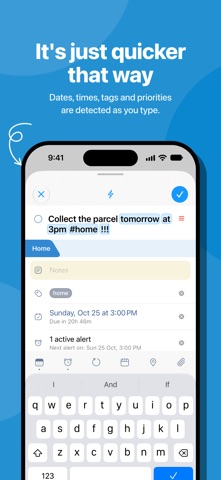
• Type naturally. 2Do recognizes dates, times, repeats, alerts, durations, priorities, tags, lists and saved locations as you type.
• Hold [+] for Quick Add and enter one task after another.
• Capture with Siri, Shortcuts, widgets and Control Center. Turn shared text, links, photos or videos into tasks.
• Email tasks to your private Mail to 2Do address, or send a numbered list to create a checklist.
• Collect ideas in the GTD Inbox and organize them later.
SIMPLE TASKS, CHECKLISTS & PROJECTS
• Create tasks, checklists and projects with sub-tasks. Add notes, images, voice recordings and multiple alarms.
• Write notes with live Markdown formatting and keep useful links with your tasks.
• Set flexible repeats, start dates and durations. Call, email or open a link from a task.
• Arrange tasks in named sections within a list.
LIST GROUPS, LISTS & SMART LISTS
• Organize your lists in groups, alongside built-in views for upcoming, starred and scheduled tasks.
• Save searches as reusable Smart Lists. Search titles, notes, tags and dates, with sounds-like matching when needed.
• Filter by date, priority, status or tags. Each list remembers its sort order and Focus settings.
PROJECT VIEW
• Open a project to see just that project and its sub-tasks. Set its sort order independently of the list around it.
TAGS
• Organize tags in groups and tap a tag to filter tasks.
• Combine tags with Smart Lists for the tasks you return to often. Pause a tag to hide its tasks until you resume it.
LOCATIONS
• Create and assign locations, find nearby tasks on a map and build location-based Smart Lists.
• Get a reminder when you arrive, with location access enabled.
SYNC, YOUR WAY
• Sync with Apple Reminders, Dropbox, Todoist, Toodledo, iCloud, Fastmail, Fruux, Yahoo or a CalDAV server you trust.
• Keep tasks in Apple Reminders across your devices and capture them with Siri.
• Merge work from different devices or exclude private lists from sync.
COLLABORATE
• Share lists and work together over local Wi-Fi without a cloud service.
• Share read-only or editable lists over iCloud with others using compatible versions of 2Do.
FIND AND FOCUS
• Jump to any task or list with Quick Open.
• Select several tasks to schedule, defer, tag, move or edit them together.
ALARMS & YOUR DAY
• Set multiple alarms, automatic reminders and repeating alerts.
• Use full-screen alarms on supported devices with iOS or iPadOS 26.1 or later.
• See calendar events and the day timeline above your tasks to plan around appointments.
MADE FOR IPHONE
• Slide between your lists, tasks and the Tags, Nearby and Calendar panels. Pinch to choose how much task detail you see.
• Check tasks on Apple Watch and add complications to your watch face.
PASSWORDS & BACKUPS
• Lock individual lists or the whole app.
• Keep automatic backups, save and restore external backups, or restore a single list. Move backups between 2Do on iOS and Mac.