
iPhone Screenshots

Description
Set virtual boundaries to restrict robot movement in specific areas. Assign cleaning tasks to particular rooms with customizable names and adjust cleaning power settings. Initiate and terminate robot operations remotely.
With the ROB-Connect App you have access to all the great robot features.
NO-GO-AREAS
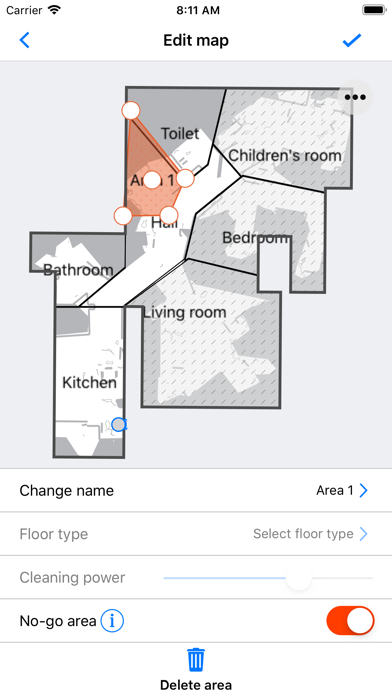
With the ROB-Connect App, you can set virtual boundaries (No-Go Areas) for whole rooms or specific places to tell your robot where not to go.
TARGETED CLEANING
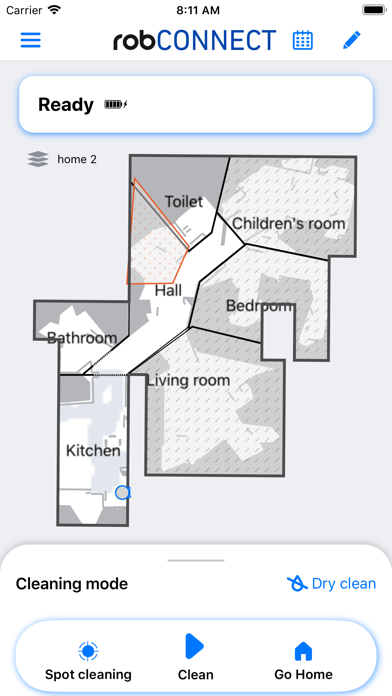
Let the robot clean specific rooms or areas via the ROB-Connect App. You can also edit the room name as well as the required cleaning power necessary for a specific room.
REMOTE CLEANING
Start and stop your robot via the ROB-Connect App from absolutely anywhere.
SCHEDULE CLEANING
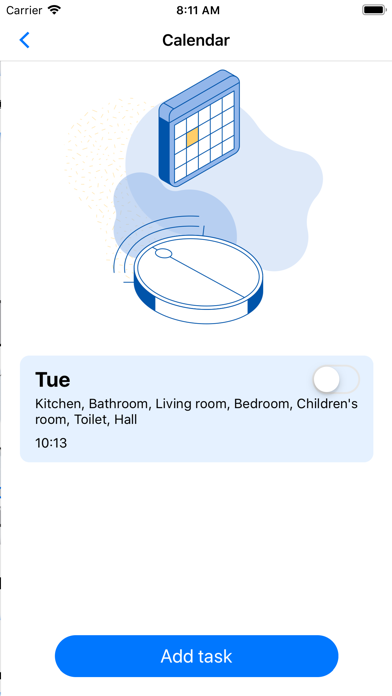
Set a regular schedule for daily cleaning via ROB-Connect App. Set up the time and date in the calendar and the robot will start the scheduled cleaning automatically.
TROUBLESHOOTING
When the dustbin is full or when your robot is blocked from returning to its base station the ROB-Connect App your will keep you informed. If a there is a problem with your robot, the app can assist you to either understand and solve the problem or report it to us, so we can improve our service to you.
SOFTWARE UPDATES
Firmware updates for your robot are installed via the ROB-connect App, so your robot is always kept right up-to-date.
CONNECTIVITY REQUIREMENT
A standard Wi-Fi router (2.4-GHz network) is all you need to keep your robot connected.