
iPhone Screenshots






Description
Vulture is a soaring planning and analysis app built for glider, paragliding, and hang gliding pilots. Plan a task on the day, fly it with live airspace and weather, then replay every thermal back on the airfield — no laptop required.
Plan
* Build a task from waypoints, or import one from a CUP file, WeGlide, or SoaringSpot.
* Scan a task straight from a QR code — the codes XCTrack and the other gliding tools share tasks with.
* Edit any task to fit the weather of the day, with custom observation zones per turnpoint.
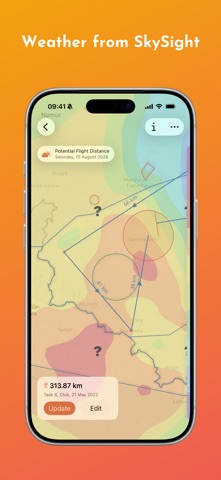
* Check the day with dozens of SkySight weather layers — thermals, cloud cover, storms, rain, and wind — before you commit to a task.
* Export a task to CUP or FLARM declaration files for your IGC-approved device, or share a FLARM declaration straight from the settings.
* Import OpenAir, CUB, and openAIP airspace files, pull predefined sets from XCSoar, or show OpenAIP airspace directly on the map as a live vector layer — so every task respects the airspace around it.
Fly
* See airspace and optimized flight information in the air, and navigate to any waypoint.
* Look up the nearest airfield and its frequency, provided by OurAirports.
* Long-press the map to see the airspace above that point as a vertical profile, with your own altitude marked in flight.
* Automatically detect your sport and apply optimized thresholds for thermals, takeoff, and landing.
Analyze
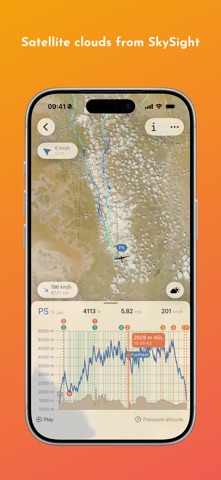
* Replay one or more flights with a barograph and detailed statistics as you scrub through them.
* Overlay satellite cloud imagery on the map and scrub the barograph to see the clouds at each moment during a flight (requires SkySight).
* Drag the graph handle for a calculated wind estimate at any point in a flight.
* Dig into thermal analytics to see where you gained — or lost — time and height.
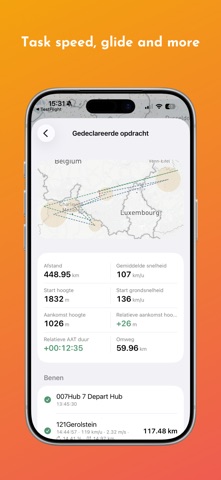
* Review optimized distance, release point, maximum altitude, and much more.
* Add searchable remarks to saved flights, mark contests, and keep your favorites.
* Compare flights side by side with leader/leecher analysis — see who found thermals first, who waited, and who flew independently.
* Upload flights to SkyLines, WeGlide, SoaringSpot, or Charron without leaving the app.
Everywhere
* Sync flights, tasks, waypoints, airspace, and all settings across your devices with iCloud.
* Import flights by drag and drop, from Files, or straight from the share sheet.
* Open flights and tasks directly in Vulture from SoaringSpot and Charron using the Chrome extension.
* Share a Soaring Spot results link and it opens even without Vulture — that day's scoreboard, and every pilot's flight on a map.
* Preview flight, waypoint, and airspace files in Files before you import them.
* Find flights and tasks from Spotlight on your home screen.
* Widgets for the wind at your home base, tomorrow's forecast for the launch window, and a flight from your logbook drawn as its track — on the Home Screen, the Lock Screen, and in StandBy.
* Hardware keyboard shortcuts, pointer support, and dark mode included.
Try every feature free during the trial. Keep flying with Vulture by choosing a subscription plan whenever you're ready.
Tell us how we can make Vulture better.
Terms of use: https://vulture.aero/terms