
iPhone Screenshots
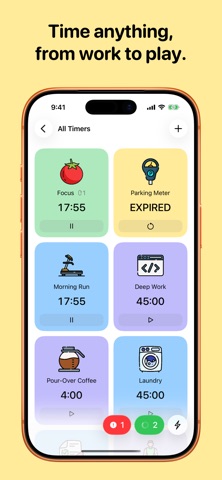


Description
PowerTimer is a beautifully designed timer app to handle EVERY timing need you have. Cooking, working out, study, work, or play — you can create timer routines that suits your needs.
◎ Beautifully full screen
You can open a timer full screen (or in a dedicated window on iPad). Large countdown text is visible from across the room, especially helpful when you are working out or cooking — or when you need a quiet living companion on your desk for work or study.
◎ As complex as you need
Each timer can have multiple sections. You can loop sections, and add multiple steps.
Each step can have its own ringtone, duration.
Upon expiry, configure the timer to allow snoozing, or have it send you multiple notifications for your attention.
◎ Customization
You can colour your timers as sticky notes, available in six colours.
Pick an icon that fits, and a rocking animation that loops as it counts down.
You can also create groups to further organize your timers.
◎ Home Screen widgets
Pin a timer to the Home Screen with widgets, or see it on iPhone in StandBy. Tap the timer, and you are taken directly to the app, opening the timer in full screen.
◎ Siri and Shortcuts
Control your timers via voice commands with Siri. Create complex workflows in Shortcuts that controls or checks the timer status. The possibility is endless.
◎ iCloud sync
Your timer configuration is automatically saved to iCloud — no sign-up required. You will still have local timer runs: they don’t sync by design.
—
Download PowerTimer today to try it out! You can use timers from our gallery with no limits, or unlock all features with a single, one-time purchase.