
Remind Me: To-Do & Reminders
Create reminders from iOS apps
Harutyun Grigoryan
iPhone Screenshots


Description
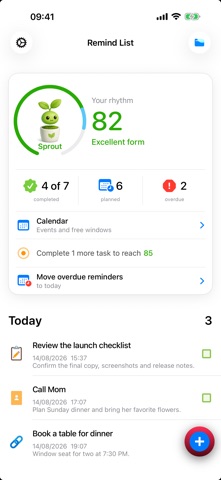
Create reminders directly from the or via iOS Share menu. Add custom reminders, import images, or select quotes to include in reminders. Set reminders to repeat daily, weekly, or monthly. View and edit existing reminders.
Remind Me helps you capture tasks and get notified at the right time—without creating an account.
Create reminders in the app or from the iOS Share sheet. Save selected text, web links, and images without interrupting what you're doing.
Stay organized:
• Add a title, notes, date, image, link, or contact
• See reminders grouped as Today, Planned, Overdue, and Completed
• Create quick reminders for one hour from now or tomorrow morning
• Use the smart calendar to see RemindMe reminders alongside read-only Apple Calendar events in one day timeline
• Set a duration and choose from suggested available times when scheduling a reminder
• Open saved links and contact details directly from a reminder
• Manage overdue reminders and move selected items to today
RemindMe Supporter:
Support ongoing development and unlock Live Activity for your nearest reminder on the Lock Screen and in Dynamic Island, plus a morning overdue-reminder notification with a quick Move to Today action.
Core reminder features remain free. Some features require notification, photo, camera, or contact permissions and work only when you choose to enable them.
Terms of Use (EULA):
https://www.apple.com/legal/internet-services/itunes/dev/stdeula/