
SwiftLists: Grocery List
Track items, categorize, share, and delete
Benjamin Warren
iPhone Screenshots




Description
Track items and organize them by category for efficient shopping. Assign items to departments, share with others, and mark items as completed to remove them. Create reusable for frequently purchased items.
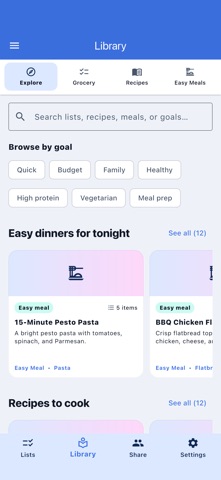
Plan groceries, discover recipes, and turn easy meals into shared shopping lists—without rebuilding the same list every week.
SwiftLists keeps repeat shopping simple. Start from a ready-made template in the Library or create your own reusable grocery list, then check items on when you need them and off after you buy them.
DISCOVER LISTS, RECIPES, AND EASY MEALS
• Browse ready-made grocery lists organized around real goals
• Find recipes and quick meal ideas when you do not know what to make
• Copy a template to your account and personalize every item
• Search by ingredients, diets, meal-prep needs, and household goals
SHOP AND COOK IN ONE PLACE
• Turn recipe ingredients into an organized shopping checklist
• Switch between Shop and Cook views
• Keep cooking instructions and ingredient measurements with the recipe
• Add a cover image so favorite recipes are easy to recognize
SHARE THE WEEKLY SHOPPING
• Sync grocery lists with family, a partner, or roommates
• See shared changes across devices
• Keep separate lists for different stores, trips, diets, and occasions
MOVE THROUGH THE STORE FASTER
• Sort groceries by aisle, category, or store section
• Reuse the items you buy every week
• Choose whether checked items stay available for next time or disappear
• Use bulk actions, notes, custom categories, and custom groups
• Keep working offline when a store has poor reception, then sync later
SwiftLists is designed for households that want a practical grocery planner, a reusable shopping checklist, and recipe inspiration without unnecessary complexity.
Some Library and customization features require SwiftLists Premium. Payment is charged to your Apple Account after any trial period. Subscriptions automatically renew unless canceled at least 24 hours before the end of the current period. Manage or cancel your subscription in your App Store account settings.
Premium is an In-App-Purchase Charged to your iTunes account after your free trial expires, auto-renewing (renew price same as original purchase) 24h prior to expiry, managed in iTunes account settings, renewals must be canceled 24h before end of period. Unused free-trial period forfeit upon purchase.
Privacy Policy: https://swiftlists.app/privacy-policy
Terms of Use: https://www.apple.com/legal/internet-services/itunes/dev/stdeula/