
ReadMe - Novel & Comic Reader
Open files from the cloud
GwangBeom Park
iPhone Screenshots




Description
Read files with line spacing, theme, font size, and paging animation settings. Add bookmarks. Support cloud downloads from iCloud, Google Drive, Dropbox, and One Drive. Upload via iTunes. Compressed files like ZIP are supported.
A reader that does one thing: let you read.
Novels, comics — it's all ReadMe now.
We stripped out the clutter and kept only what reading actually needs.
[Files it opens]
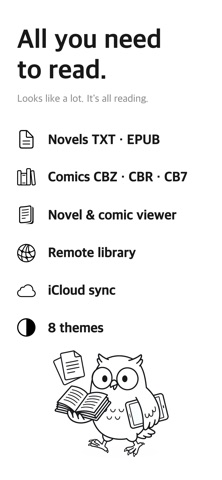
Novels — TXT, EPUB, SMI
Comics — CBZ, CBR, CB7, PDF, TIF, and plain JPG / PNG images
Got a ZIP? Just drop it in. ReadMe unpacks it for you.
[New in this update]
Comic Viewer — scroll straight down page after page, or flip two pages at a time. Messy margins get trimmed and the artwork sharpened, automatically
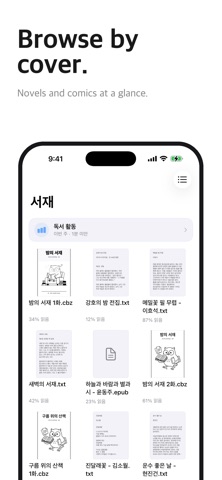
Cover Grid — see your whole library as covers, with your progress right under each one
Remote Library (Pro) — books piled up on your NAS? Leave them there. Connect an SMB, WebDAV or OPDS server and open them on the spot
Auto Series Sorting (Pro) — ReadMe pulls the title and volume number out of the filename and groups the same series together
Reading Stats (Pro) — daily, weekly and monthly reading time, plus a record for every book
Face ID Lock — lock the whole app, or with Pro, just the files and folders you pick
[The basics, done right]
Pick up where you left off — your library remembers the exact spot and how far you've come
Make the page yours — 8 themes (Light, Paper, Sepia, Sage, Lavender, Dark, Midnight, Black) plus font, size, line spacing, margins, and page-turn or scroll
Big files, no waiting — a 60 MB omnibus with tens of thousands of pages opens right up
Encoding sorted out for you — UTF-8, EUC-KR and other older files show up без garbled text
Filename repair — if names come out scrambled when a ZIP is unpacked, ReadMe puts them back
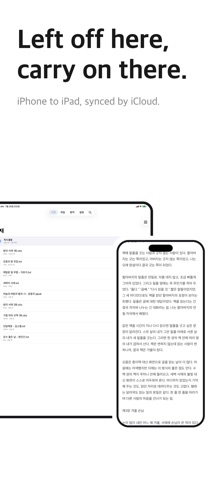
iCloud Sync — start on iPhone, continue on iPad from the same line (in-app purchase or Pro)
Import from the cloud — iCloud Drive, Google Drive, Dropbox, OneDrive and more
From your Mac or PC — upload easily through Finder file sharing
[ReadMe Pro]
Unlocks Remote Library, Auto Series Sorting, Reading Stats, and per-file and per-folder locking.
While Pro is active, ads disappear and iCloud Sync switches on too.
Choose monthly, yearly, or lifetime — whichever suits you.
[iCloud Sync]
Read a novel on your iPhone and carry on from the same spot on your iPad.
Files, reading positions and bookmarks stay in step across all your devices.
Either the one-time purchase or ReadMe Pro gets you there.
[Importing from the cloud]
To bring in files from a cloud service, install that app (Google Drive, Dropbox, OneDrive and so on) on your iPhone and sign in first.
From Naver MYBOX, use 'Share → Open in another app' to copy files over to ReadMe.
Something bugging you while you read? Tell us through Settings > Contact. We're listening!
Terms of Use: https://www.apple.com/legal/internet-services/itunes/dev/stdeula/
Privacy Policy: https://parkgwangbeom.github.io/privacy/