
iPhone Screenshots


Description
Share photos and documents from a phone to an Apple TV without using AirPlay. Send any photo or PDF instantly for big-screen viewing. View photos and documents on a phone without the screen locking.
Display any photo or PDF from your iPhone directly on your Apple TV — instantly, no AirPlay required.
Perfect for family photo slideshows, presentations, sheet music, and more. TVAirScreen makes the big screen effortlessly simple.
Key features:
- Send any photo or PDF to Apple TV in seconds
- Your iPhone screen stays on — no auto-lock while viewing
- Works independently of AirPlay, no complex setup
How to get started:
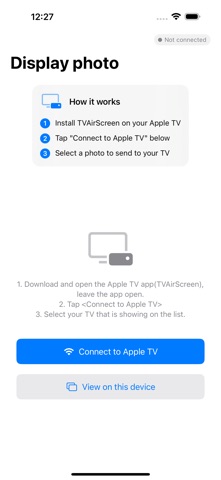
1. Download "TVAirScreen" from the Apple TV App Store
2. Open the app on your Apple TV
3. Open TVAirScreen on your iPhone and select your Apple TV from the list
4. Tap any photo or PDF — it appears on the big screen instantly
Note: Requires Apple TV.