
Tally Hoops - Basketball Stats
Track shots and record with Apple Watch
Matthew Parrott
iPhone Screenshots





Description
Track by spinning the Apple Watch crown up for made shots and down for missed shots. Log sessions, view results, and analyze performance data through the iPhone . Set goals and review progress over time.
Tally Hoops is the hands-free shot tracker for hoopers who want every make, every miss, and every personal best — and it shows you something no box score does: what fatigue does to your shot. Built for Apple Watch, iPhone, and iPad.
Whether you're getting up 200 free throws after practice or putting in late-night work in the gym, Tally Hoops keeps the score so you can keep shooting.
APPLE WATCH, BUILT FOR THE GYM
Run a session straight from your wrist. Tally Hoops on Apple Watch is a native workout, so heart rate, calories, distance, and steps flow into Health automatically.
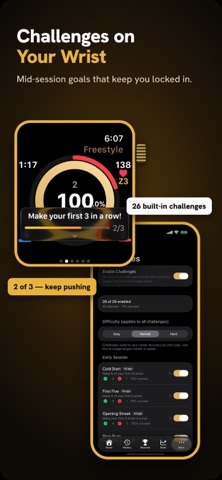
• Rotate the Digital Crown up for a make, down for a miss — no looking, no fumbling, no lost count.
• Double Tap to log a make. Pinch your fingers mid-rep and the count goes up without breaking rhythm. (Apple Watch Series 9, Ultra 2, or later.)
• Live Activities and complications keep your stats glanceable on every face.
• Queue today's drill from your phone and run it from your wrist.
FIND YOUR FATIGUE CLIFF
Every shot you log on Apple Watch is tagged with your heart rate — and that changes what you can learn:
• Fatigue Cliff: see the BPM where your make rate falls off, and feel a wrist tap mid-session when you cross it.
• Make rate by heart-rate zone — how you shoot fresh vs. gassed.
• Track your cliff month over month as your conditioning improves.
• Coach's Corner: AI recaps that read your numbers and tell you what to work on next — generated on-device.
TWO MORE WAYS TO TRACK
• Assist Mode: hands-free voice logging. Say "make" or "miss" and keep shooting — on-device speech recognition, audible shot feedback, live progress ring. Works best with AirPods.
• Video Mode: record your full session with synced shot tags. Capture your form, replay the rep, revisit the moments that mattered.
CHALLENGES, DRILLS & GOALS
• Challenges — free for everyone: dynamic in-session goals that surface as you shoot. Cold Start, Opening Streak, Beat Your Best, Clutch Shooter, and dozens more across Easy, Normal, and Hard.
• Drills: structured reps with shot count, focus area, and difficulty. Run a built-in drill or build your own, then send it to your Watch.
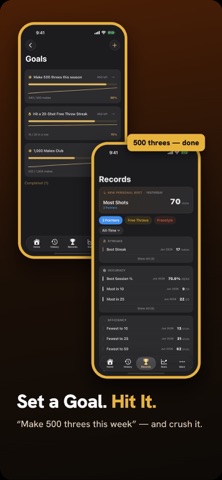
• Goals: weekly or monthly targets for makes, shooting %, practice days, and streaks.
RECORDS, STATS & 100+ BADGES
Streaks, best sessions ever, free-throw PRs, three-point heaters. A shot-volume heatmap, trends by shot type, and highlights after every workout. Earn badges across tiered milestones, up to a Mastery tier for true gym rats.
PERSONALIZED TRAINING PLANS (Premium)
AI-generated daily drills tuned to your shooting profile. Get a fresh plan each day, queue it to your Watch, and let your stats steer your work.
EVERYWHERE YOU SHOOT
Start a session on your Watch, finish on your iPhone, review on your iPad or Mac. iCloud keeps every session, record, and badge in sync — no account needed.
DEEP APPLE INTEGRATION
• HealthKit workouts (heart rate, calories, distance, steps)
• Apple Music: see exactly what you were shooting to, logged with every set
• Siri Shortcuts & App Intents: "Start a shooting session," log makes and misses, show today's stats
• Live Activities, Widgets, Spotlight, and complications
SESSION TYPES
Free throws, three-pointers, freestyle, workout-only — or a mix of all four.
PREMIUM
Premium unlocks AI training plans and coaching, your fatigue-cliff trend over time, heart-rate-zone shot stats, unlimited drills, goals, and Video Mode, and Mastery badges. Free trial available — or grab the one-time Lifetime unlock and own it outright, no subscription.
PRIVACY-FIRST
No account required. Works fully offline. Voice recognition and AI coaching run on-device. iCloud sync is encrypted in transit and at rest.
Terms of Use: https://www.apple.com/legal/internet-services/itunes/dev/stdeula/
Privacy Policy: https://www.mawapa.app/privacy-policy
Get up shots. Keep the count. See the stats.