
FAR AIM
Bookmark FAA regulations and manuals
Aviation Mobile Apps, LLC.
iPhone Screenshots



Description
Access FAA regulations and aeronautical information. Bookmark and highlight content. Sync bookmarks across devices. Receive alerts for regulatory changes. View CFR Title 14 and Title 49 Subtitle B. Includes updated Federal Register amendments.
“Do I need a clearance to enter Class B?” Ask Super Search in plain English, then tap the citation to read the regulation or AIM guidance in context.
Your FAR AIM updates automatically. You can read and search downloaded material offline. One purchase. No subscription.
See what changed. Hear about significant news.
The new News Feed brings aviation briefings and official sources together. Follow the topics you care about, save a briefing to read offline, or open a before-and-after comparison to see what changed in a regulation. Turn on alerts for newly published emergency final rules.
Let FAR AIM keep your reference current.
We check official sources every weekday and deliver FAR and AIM changes directly in the app. Browse Title 14, Title 49 Subtitle B, the Aeronautical Information Manual, the Pilot/Controller Glossary, Flight Services, and Air Traffic Control on iPhone or iPad.
Keep the passages you come back to.
Bookmark a page, highlight in your own colors, or attach a note to the exact words that got you thinking. Find your notes again in Saved or Super Search. When the source changes, FAR AIM restores verified highlight matches and keeps your original saved text available for review. Bookmarks, highlights, colors, and Learn progress sync across devices using the same Apple Account.
Give your students a question to think about.
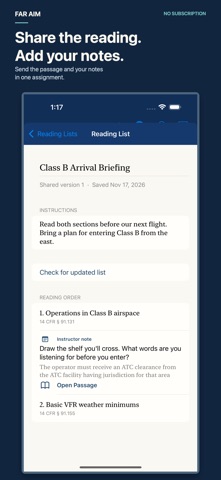
Put readings in order, add instructions and highlights, and choose the passage notes you want to share. Send one link. Students can preview the assignment, save a copy, and tap Open Passage to read the source in context.
Make the next study session count.
Work through Private, Instrument, or Commercial study paths with briefings, scenarios, and questions to bring to your instructor. Switch to Dark mode, adjust the text size, or find a word inside an article.
For iPhone and iPad running iOS or iPadOS 18 or later.