
iPhone Screenshots


Description
Every file on your Mac carries two dates: when it was created and when it was
last modified. Scanners, converters, restores from backup, downloads and
AirDrop all overwrite them — so a shoebox of holiday photos from 1998 ends up
claiming it was made this morning, and every app that sorts by date gets it
wrong.
File Date Modifier puts those dates back. Drag in a file, a folder, or a few
thousand of them, choose what the dates should be, and apply.
THREE WAYS TO SET A DATE
• Set Date/Time — write an exact created and modified date, down to the second.
Update the date but keep the time, or the other way round. Copy the created
date onto modified, or reuse one for both.
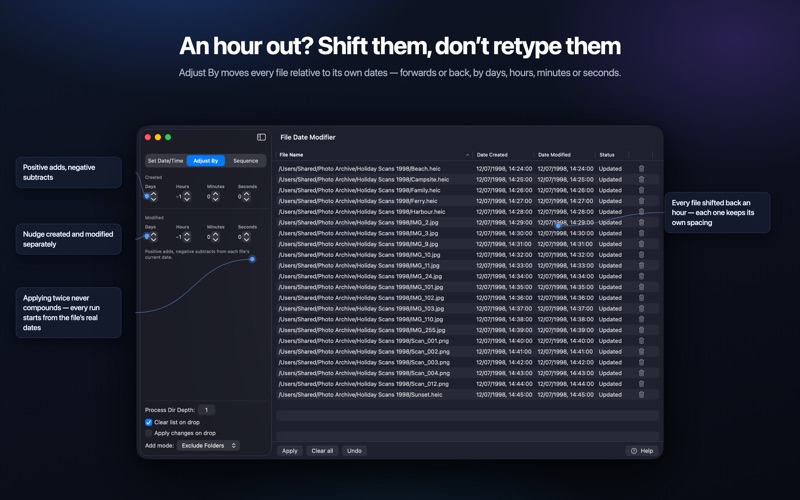
• Adjust By — shift every file relative to its own dates, by days, hours,
minutes or seconds. Positive adds, negative subtracts, and created and
modified can move by different amounts. Perfect for a camera that was an hour
out all week.
• Sequence — stamp a run of files a fixed interval apart: one second, one
minute, an hour, whatever you set. Start from a date you pick or from the
first file's own timestamp, and the list's order becomes the date order — the
fix for photo libraries and media players that sort by date.
BUILT FOR WHOLE FOLDERS
• Drop folders as well as files, and choose how many levels deep to scan.
• Include everything, or leave out the files, or leave out the folders.
• Sort the list by name, date created or date modified. Names sort in natural
order, so IMG_2 comes before IMG_10, exactly as Finder does it.
• Apply changes on drop updates dates the moment files land — no clicking.
• Undo restores every file to the dates it had before the last apply.
• Large batches run in the background: the window stays live, progress keeps
counting, and Cancel answers straight away.
• A log window records anything that didn't apply, and can be copied out or
exported as JSON.
WHO IT'S FOR
• Anyone digitising old photos, slides or negatives, where every scan comes out
dated today.
• Photographers and videographers reconciling files from a camera whose clock
was wrong.
• People restoring from backups, migrating drives or unzipping archives that
flattened every timestamp.
• Anyone who needs a folder to appear in a particular order in an app that only
sorts by date.
HOW IT WORKS
File Date Modifier is a native macOS app. It is sandboxed, it has no network
access, and it only ever touches the files you drag into the window. It changes
dates and nothing else — file contents are never modified.
One purchase, and it's yours. No subscription, no in-app purchases, no account
to make, no ads.
Requires macOS 13 or later.