
printAR - PDF Documents in AR
Interact with in augmented reality
Till-Eugen Koenitzer
iPhone Screenshots




Description
Interact with in augmented reality by moving, rotating, or stacking them. Preview designs in a real-world environment to test layout and colors. Share for collaborative editing and viewing.
printAR enables you to interact with documents in Augmented Reality. Use printAR to preview design work like Posters, in meetings to present documents or use it to collaborate on a pin board.
INTERACT
Interact with your documents as if they were printed: Move, rotate or stack them. Double tap to look at them full screen.
PREVIEW WITHOUT HAVING TO PRINT
Preview your documents before printing them to test font sizes, colors, etc. in a real world environment. Then, only print the final product.
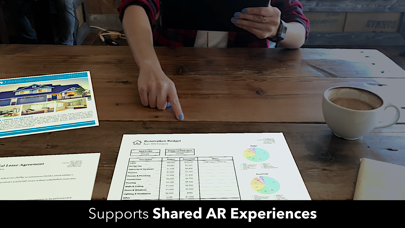
SHARED AR EXPERIENCES
Enable others to see what you see on their own device. Invite up to 7 other users to join your AR experience. While joining an AR experience is free, starting your own shared AR experience requires a one-time purchase.
GREAT FOR MEETINGS AND MORE
Place documents on a desk around you and quickly access valuable information by simply moving your device or enable others to see the same documents.
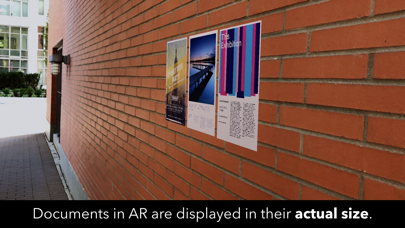
ACTUAL SIZE
Documents in AR are displayed in their real world dimensions.
SURFACE DETECTION
printAR can detect horizontal surfaces, such as table tops, and vertical surfaces, such as walls.
SUPPORTED FILE TYPES
The app currently only supports PDF documents.
KEY FEATURES
• Shared AR Experiences
• Horizontal & vertical surface detection.
• Document interaction: Move, rotate, stack.
• Full screen PDF viewer.
• Document texture mimics real paper.
• Lighting estimation to account for real world environment.