
PDF Scanner: Photo & Document
Scan documents and save as PDF
Nguyen SonTung
iPhone Screenshots






Description
Scan documents like bills, receipts, and IDs into high-quality PDF or JPEG files. Share, email, or print documents directly. Upload to cloud services. Access premium features via an optional subscription.
PDF Scanner turns your iPhone and iPad into a powerful pocket document scanner. Scan anything to a clear, high-quality PDF — then convert it to Word, Excel, sign, and share in seconds. Trusted by thousands of users worldwide.
Scan receipts, IDs, passports, contracts, notes, books, business cards, and homework anywhere, anytime.
SCAN ANYTHING
• Auto-detect edges, auto-crop, and correct perspective
• Smart filters: enhance, black & white, color, remove shadows and noise
• Scan with your camera or import from Photos
CONVERT & EXPORT
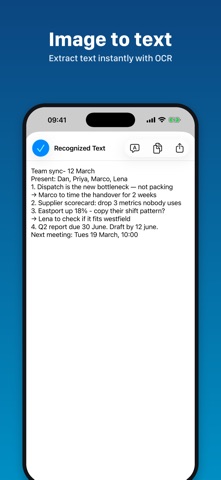
• Image to PDF, JPG to PDF, and photo to text (OCR)
• Convert and edit to Word, Excel, CSV, and TXT
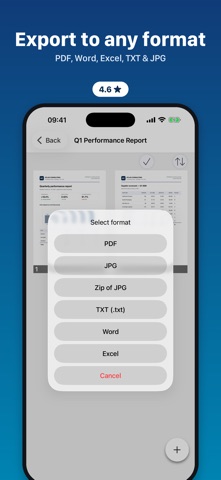
• Export as PDF or JPG and share via email, AirPrint, or cloud
• Upload to Google Drive
• Compress PDF to shrink file size
EDIT & SIGN
• Add your e-signature, draw, highlight, and markup
• Add text and stamps to any page
• Combine pages into a collage PDF
ORGANIZE & FIND
• Folders › documents › pages
• Rename, move between folders, and search by name, date, or page count
Download PDF Scanner free and turn your camera into a full document scanner today.
— SCANNER PRO SUBSCRIPTION —
PDF Scanner offers an optional auto-renewable Scanner Pro subscription unlocking all current and future premium features:
• Weekly — $3.99
• Monthly — $9.99
• Yearly — $49.99, with a 3-day free trial
Prices are in USD and may vary by region — see the app for exact pricing.
• Payment is charged to your Apple ID at confirmation of purchase.
• Subscriptions renew automatically unless auto-renew is turned off at least 24 hours before the end of the current period.
• Your account is charged for renewal within 24 hours prior to the end of the current period.
• Any unused portion of the 3-day free trial is forfeited when you purchase the Yearly subscription.
• Manage or cancel your subscription anytime in your Apple ID Account Settings. No refunds for the unused portion of a term.
Terms of Use (EULA): https://www.apple.com/legal/internet-services/itunes/dev/stdeula/
Privacy Policy: https://bmit-mob.web.app/privacy-policy.html
Questions? Contact us: https://bmitmob.business.site/