
iPhone Screenshots




Description
HOW IT WORKS:
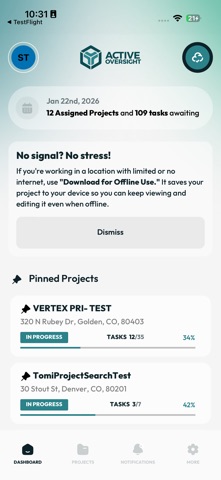
- Mobile Dashboard: Stay up to date with your Mobile Dashboard to see an overview of all task statuses, active projects, and locations for each task.
- Mobile Notifications: View notifications and stay up to date on the status of your tasks and projects
- Tasks: Filter and view your tasks based on status – not started, in progress, in review, and completed.
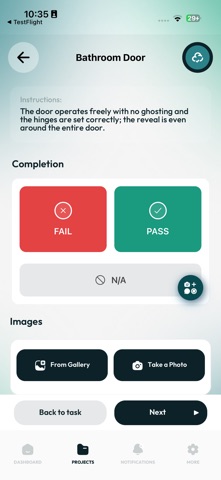
- Completion Steps: Upload required photos and documents, checkoff required steps, and approve or reject your assigned completion steps.
- Projects: View detailed information regarding your project such as, location, assigned project manager, current weather, and project status.
- Maps: Use our map feature to view project locations and easily navigate to your job site.
- Directory: Access to a complete list of all employees within your company and contractors assigned to each project you are on.
Note: You must log in to the Active Oversight app by using your valid credentials. For assistance, contact [email protected].