
iPhone Screenshots



Description
Move, duplicate and delete lines right inside Xcode. LineSmith adds 31 commands for everyday line editing and Swift code generation, with keyboard shortcuts you choose.
Formerly TextPlus. Your existing shortcuts still work.
COMMANDS
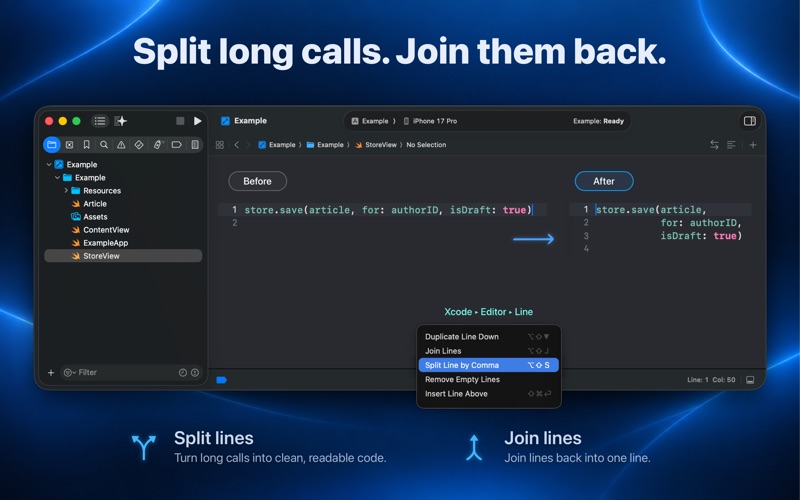
Editor > Line
• Move Line Up / Move Line Down — swap the selection with the line above or below
• Duplicate Line Up / Duplicate Line Down — copy the selection and choose which copy keeps the caret
• Delete Line — delete whole lines wherever the caret sits
• Clear Line — empty the lines but preserve their indentation and place
• Clear Line and Paste — replace the selected lines with the clipboard
• Copy Line / Cut Line — put whole lines on the clipboard, no selecting first
• Insert Line Above / Insert Line Below — open a blank line at the right indent
• Join Lines — collapse a selection onto one line, spacing it sensibly around brackets
• Split Line by Comma — break a comma-separated line apart, aligned under its bracket
• Remove Empty Lines — drop the blank lines inside a selection
• Next Blank Line / Previous Blank Line — move the caret between blocks
• Trim Trailing Whitespace — remove spaces and tabs from selected line endings
• Collapse Empty Lines — reduce each run of blank lines to one
• Remove Duplicate Lines — keep the first occurrence of each exact selected line
• Sort Lines Ascending / Sort Lines Descending — sort selected lines deterministically
• Reverse Lines — reverse the order of the selected lines
Editor > Editor+
• Remove Comment — strip // comments, leaving code and string or regex literals alone
• Add Type Extension — write an extension on the first type declared in the file
• Add Type Delegate — write a delegate protocol for it
• Insert MARK Section — insert a // MARK: section placeholder
• Wrap in #if DEBUG — wrap selected lines in a conditional compilation block
• Organize Imports — sort and de-duplicate safe, contiguous Swift import blocks
• Wrap in Task — wrap and indent selected lines in Task { }
• Generate Memberwise Initializer — create a conservative initializer from stored struct properties
• Generate CodingKeys — create CodingKeys from direct stored properties
FREE, AND STAYING FREE
All 31 commands are free. There is no paid tier, no account, no ads and no tracking. It collects nothing about you or your code. There is a tip jar in the app if it saves you time; a tip unlocks nothing, because there is nothing to unlock.
SETTING IT UP
1. Keep LineSmith in your Applications folder.
2. In System Settings, find Xcode Source Editor and enable both Line and Editor+.
3. Restart Xcode.
4. Assign shortcuts in Xcode > Settings > Shortcuts (Key Bindings in earlier Xcode versions).
Requires macOS 14 or later, and Xcode.
FORMERLY TEXTPLUS
The 19 command identifiers inherited from TextPlus are unchanged, so existing keyboard shortcuts carry over. Version 2.0 also brings reliability fixes and 12 new commands, for 31 in total.