
Easy Stop Motion Camera Lite
Create time-lapse movies by touching the screen
KOJI HARA
iPhone Screenshots

Description
Create time-lapse videos by tapping the screen. Each frame is shown in faded light for easier alignment. Limitations include a maximum of 30 frames and a watermark in the Lite version.
◆Tap the screen and what the camera sees at that moment is recorded as one frame. Move your subject a little, tap again, and repeat: that is all it takes to build a stop-motion video.
◆No ads. No notifications. No account needed. Everything from shooting to saving happens on your device, so it works without an internet connection. Your photos and videos are never sent anywhere.
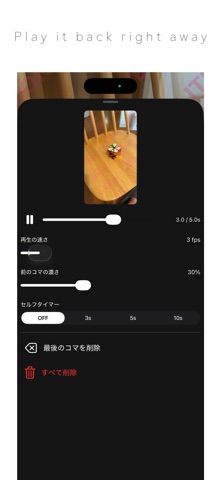
◆The previous frame stays on screen semi-transparently, so lining up the next one is easy. Move your subject a little at a time and you can make things jump, vanish or multiply exactly as you intend. It suits clay animation with modelling clay, figures, dolls and miniatures.
◆Work in progress is saved automatically inside the app. The frames you are still working on live only inside the app; only the finished video ends up in your photo library. Quit the app or restart your device and you can pick up where you left off, so you can take your time over a long piece.
◆Playback speed, the opacity of the previous frame and the self-timer can be changed at any point. Playback speed is not only for the preview: it is also the frame rate of the video you export. You can play back what you have so far without leaving the shoot.
◆This is the free Lite version
Videos you save carry a LITE VERSION watermark. There is no limit on the number of frames. To save without the watermark, please use the paid version.
*Before buying the paid version, please check that this Lite version runs well on your device.