
iPhone Screenshots


Description
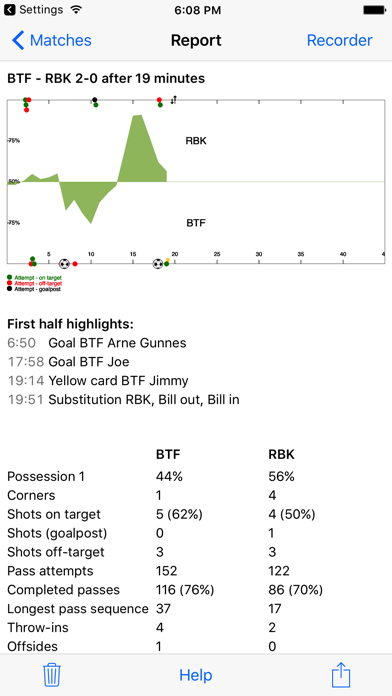
MyFootballStats lets you collect a rich set of statistics in a casual manner while watching a football game. It also lets you share the report live on my-football-stats.com. Other spectators can comment and add pictures from the game on the my-fotball-stats.com game page once you have started publishing. Visit https://my-football-stats.com to see a sample of matches which have been published.
MyFootballStats offers a unique approach to collecting statistics from a match:
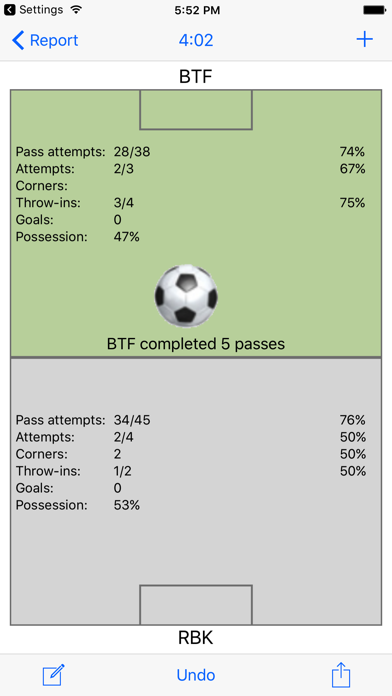
You collect possession data by entering recording mode and placing your thumb over the team which has the ball.
Lift your thumb when a player attempts a pass and place your thumb over the receiving team.
If the ball goes out of play, drag your thumb across the sideline or goal-line and release.
If a tackle is made, drag your thumb across midfield and release.
Drag your thumb over a goal and release when a shot/attempt is made. It does not matter which goal. The team with the possession gets the goal/attempt.
The app pops up a menu requesting more information when needed.
It will also ask you what happened if you release your thumb for more than 3 seconds.
Press the game clock on top of the recording screen at the end of the half to stop the game clock.
You start reporting from a new game by pressing the '' icon in the 'Matches' screen.