
FAX from iPhone: Send Document
Send faxes, receive faxes, manage faxing needs
GEODELIC, L.L.C.
iPhone Screenshots



Description
Send and receive faxes through a web browser. Manage fax documents, send faxes online, and access a free fax machine . Send to 30+ international countries. View and store sent and received faxes.
FAX FROM YOUR IPHONE
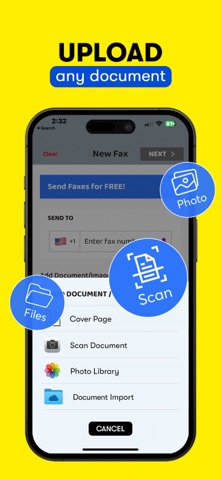
SpeedyFax makes it simple to send a fax directly from your iPhone. Scan a document with your camera or import a PDF from Files, iCloud, Google Drive, or Dropbox.
FAST FAX SENDING
Send important documents in just a few steps:
Scan or import your document
Enter the fax number
Tap Send
BUILT FOR IMPORTANT DOCUMENTS
SpeedyFax is useful for sending:
• Business documents
• Legal forms
• Medical records
• Receipts and Contracts
• Office paperwork
SMART DOCUMENT TOOLS
• Scan documents with your camera
• Import PDFs from Files, iCloud, Google Drive, and Dropbox
• Create clean fax-ready PDFs
• Add professional cover pages
• Track real-time fax delivery status
• View fax history and retry failed faxes
AI HELP FOR FAILED FAXES
If a fax does not go through, SpeedyFax can help you understand what went wrong. With your permission, our AI assistant can review the issue, prioritize reporting the failed transmission to the business, and help you get your document delivered successfully.
SUBSCRIPTION & TERMS
Payment is charged to your Apple ID account if you choose to upgrade. Subscriptions automatically renew unless canceled at least 24 hours before the end of the current billing period.
You can manage or cancel your subscription anytime in your Apple ID account settings.
Privacy Policy: https://geodelic.net/Privacy.pdf
Terms of Use: https://geodelic.net/Terms.pdf
Terms of Use (EULA): https://www.apple.com/legal/internet-services/itunes/dev/stdeula/