iPhone Screenshots
Description
Watch live video from home security cameras using 3G/4G or WiFi. Switch between multiple cameras instantly. Adjust video frame rate and resolution. View high-definition footage up to 1280 x 720.
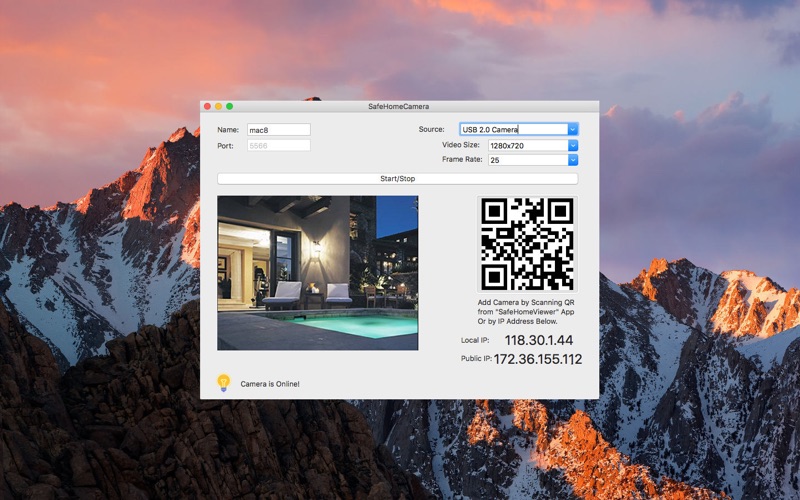
SafeHomeCamera is home security and video surveillance App, SafeHomeCamera streams video to you when you are not at home.
Features
1.Watch live video via 3G/4G or WiFi network from anywhere at anytime;
2.Connection is private, Streaming is direct connection between camera and Viewer App.
3.Multiple Cameras can be switched on the fly.
4.Control Video Frame Rate and video resolution.
5.Up to 1280 x 720 High definition is supported.
Setup:
Step 1: Download the "SafeHomeCamera" App from Mac App Store .
Step 2: Download and install the "SafeHomeViewer" Client App on iPhone or Mac.
Step 3: Add Camera by "Add by IP" or "By QR Code", you are ready to enjoy the live streaming!
Network Configure:
Please setup network properly for streamming work correctly!
1. If Camera and Client are on the same network, Please use Local IP to connect to Camera.
2.If Camera and Client are NOT on the same network(away from home) Please use Public IP to connect to Camera.
3.Configure router to Open TCP port 5566
It is important to OPEN TCP port 5566 in your router, so that you can access camera outside home.
Please refer your router manual on how to setup port forwarding.
Forward TCP port (external)5566 -> (internal)5566