
WideProtect Spam Call Blocker
Block unwanted calls and numbers
Valerii Andrusyk
iPhone Screenshots




Description
Block unwanted calls by adding phone number prefixes. Prevent spoofed numbers from appearing as local. Block up to 100 area codes or specific numbers. Manage restrictions and view blocked calls. Sync with phone contacts for automatic blocking.
Got tired of unwanted calls, telemarketers, and scammers spoofing your phone number?
WideProtect blocks spam and scam calls using phone number prefixes and patterns — block up to 1 billion numbers, covering 100 area codes in the USA.
Free to try for 3 days, with a restricted phone number count.
PROTECTION FEATURES
- Block calls by prefix or pattern — stop spoofed numbers, robocalls, and telemarketers before they reach you.
- Pre-configured prefixes for the UK, Germany, France, the Netherlands, Austria, Spain, Switzerland, Chile, and India.
- Add prefixes or patterns for any country, including satellite operators.
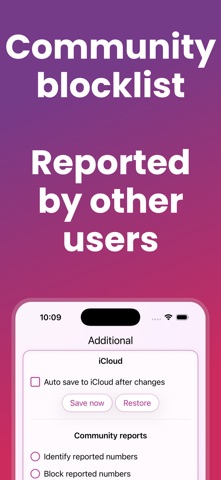
- Community-reported spam numbers — benefit from numbers flagged by other WideProtect users.
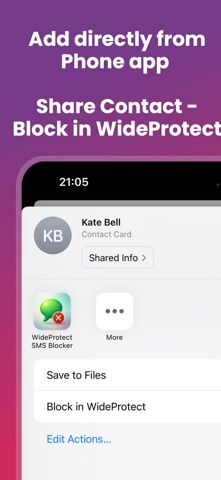
- One-tap blocking from Phone and Contacts via "Share Contact - Block in WideProtect."
PRIVACY & CONVENIENCE
- No registration, no user data collection — install and use.
- Works completely offline — your number list never leaves your device.
- Family Sharing supported, with a discounted price for the whole household.
- Help screen includes a short video manual.
WideProtect is free to download and try. A subscription or one-time lifetime license is required to continue using the app after the trial.
SETUP
After installing, grant permission to all WideProtect extensions via 'iPhone Settings -> Apps -> Phone -> Call Blocking & Identification.'
IMPORTANT NOTICES
- Don't remove the app from memory while it's updating your blocking list — safe to remove afterward.
- Since iOS 26: if you've called a number yourself, it won't be blocked until you delete that call from 'Phone' -> 'Recent.'
- Blocked calls may be forwarded to voicemail, depending on your mobile operator — contact them for details.
- If WideProtect extensions don't appear in iPhone Settings right away, add your prefix in the app, wait 1-2 minutes, then check Settings again.
- WideProtect is available via auto-renewable subscription or one-time payment. Payment is charged to your iTunes Account at confirmation of purchase. Subscriptions renew automatically unless auto-renew is turned off at least 24 hours before the end of the current period. Manage or cancel anytime in your Account Settings.
FEEDBACK & SUPPORT
Email us at [email protected] with any questions or issues.
AS SEEN ON
- iPhone-Ticker.de: https://www.iphone-ticker.de/spam-anrufe-wideprotect-kann-jetzt-1-milliarde-rufnummern-blockieren-269613/
- Mac Geek Gab Podcast: https://www.macgeekgab.com/episode/733/
- Beebom: https://beebom.com/how-to-block-spam-calls-a-complete-guide/
Terms: https://www.apple.com/legal/internet-services/itunes/dev/stdeula/
Privacy: https://sites.google.com/view/vandrusik/wideprotect/privacy-policy