
iPhone Screenshots




Description
Measure pupillary distance using computer vision. Input glasses measurements to calculate Rx details. Generate printable prescriptions for glasses or VR headsets. Save and share measurement results securely.
The easiest way to measure your pupillary distance (PD) and get your glasses prescription, right from your iPhone.
Ready to buy glasses online but missing a measurement or two? The Framery is your glasses toolkit. Measure your PD, scan your lenses for your full Rx, and shop with confidence. No appointment, no waiting room, no runaround.
MEASURE YOUR PUPILLARY DISTANCE (PD) — FREE
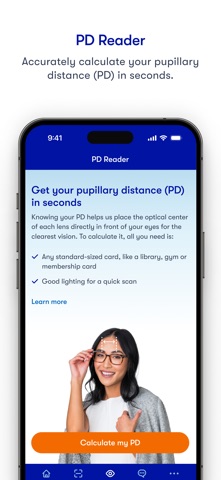
Your pupillary distance is the measurement between the centers of your pupils. It's what aligns your prescription lenses to your eyes, and it's almost never included on your prescription.
The Framery measures your pupillary distance in under 60 seconds. All you need is your iPhone and any credit card-sized card. No ruler, no mirror, no hassle.
Get your PD. Get your glasses. Done.
SCAN YOUR LENSES. GET YOUR FULL GLASSES PRESCRIPTION.
Can't find your glasses prescription? No need to call your doctor.
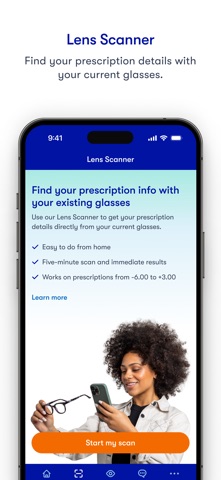
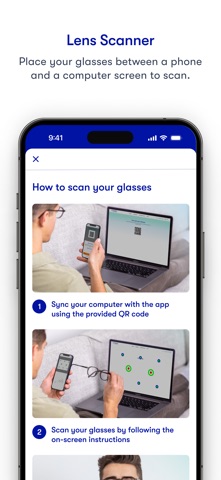
The Framery's Lens Scanner reads your prescription details directly from the lenses in your current glasses. Sphere, cylinder, axis, and pupillary distance. Your complete glasses Rx in 2 to 5 minutes.
All you need is your iPhone, a flat computer screen (12 to 27 inches), your current glasses, and any credit card-sized card.
Happy with your current prescription? Now you can reorder without the hassle.
YOUR NEXT PAIR OF GLASSES STARTS HERE
Once you have your PD and prescription, you're ready to shop The Framery's full collection. Hundreds of frames, fair prices, and a virtual try-on so you can find your perfect pair before you buy.
WHY THE FRAMERY APP
- Free pupillary distance measurement in under 60 seconds
- Glasses prescription scan with full Rx in 2 to 5 minutes
- Shop hundreds of frames after you measure
- Works with any credit card-sized card
- Clinically tested accuracy (ANSI-80.17: Rx within 0.25D, PD within 2mm)
- FDA, CE & TGA listed
IS THE LENS SCANNER RIGHT FOR YOU?
Designed for adults 18+ with a stable single vision prescription between -6.00 and +3.00 and cylinder up to -2.50.
Not recommended for multifocal, bifocal, or progressive lenses, prescriptions with prism correction, or anyone with a condition affecting eye health. When in doubt, check with your doctor.
We respect your privacy. Full policy at glasseson.com/privacy
The Framery (formerly GlassesOn) is a registered Class 1 Exempt Medical Device (FDA), CE self-declared Class 1 (EU), and registered Class 1 Medical Device (TGA). The Framery does not provide medical advice and does not replace a comprehensive eye exam. We recommend visiting your eye doctor regularly.