
iPhone Screenshots



Description
** Now Available: Videoloupe for Mac **
Videoloupe is an advanced video player offering an extensive set of features for video playback and video analysis. It offers advanced playback controls, multi-video synchronized playback, frame sequence exporting, comprehensive keyboard shortcuts, trackpad gestures and so much more.
## INDUSTRY SOLUTIONS ##
VIDEOGRAPHERS
• Playback multiple videos at once to determine the best take.
• Verify video focus and sharpness with up to 500% magnification.
• Export videos with timecode overlay.
• Perform lossless trimming.
• Use extensive keyboard shortcuts to quickly preview videos before importing into an editor.
CONSUMERS
• Export frames from videos to share as images.
• Re-live moments with slow-motion playback.
• Export marker timestamps for personal use in other applications.
COACHES & ATHLETES
• Analyze technique using video-on-video overlay.
• Find performance differences with the timing component.
• Watch multiple athletes or sessions side-by-side using synchronized playback.
## NOTABLE FEATURES ##
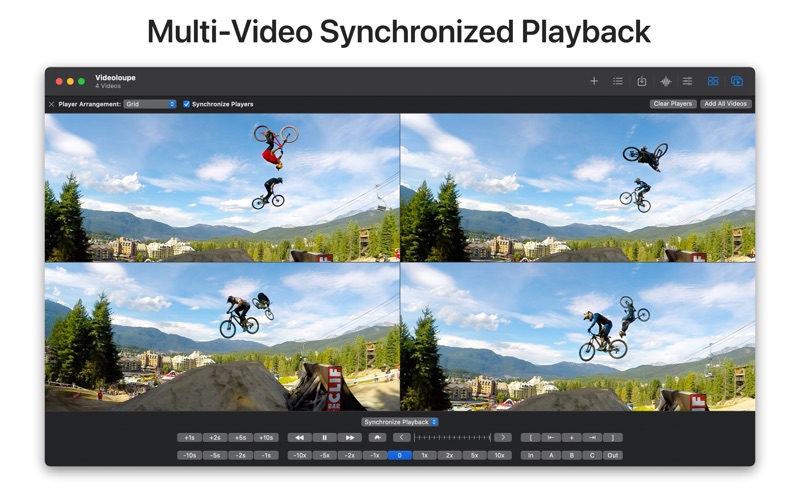
MULTI-VIDEO SYNCHRONIZED PLAYBACK
• Control playback of multiple videos using a single playback controller.
• Step, scrub and seek videos while maintaining their respective playback positions.
• Simultaneously adjust playback position on multiple videos using group markers.
• Independently set each video's initial playback time.
TIMING ANALYSIS
• Use the stopwatch timer to measure elapsed time independant of the current track time.
• Compare timers between synchronized videos to calculate offset times.
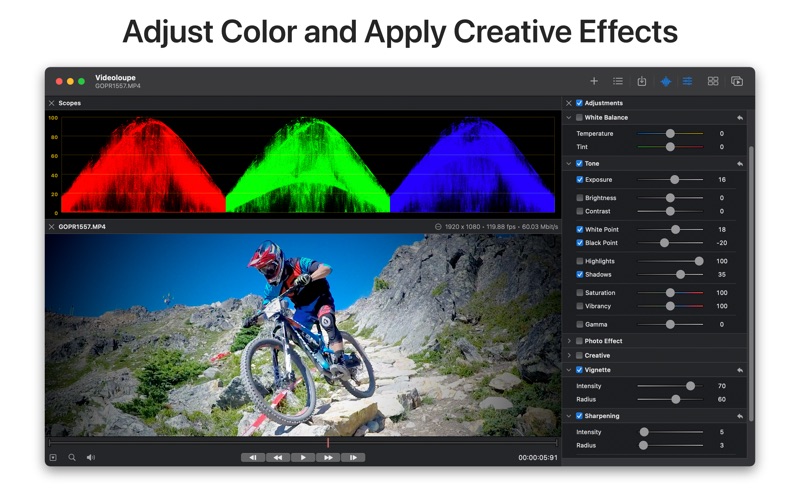
COLOR ADJUSTMENTS
• Make basic color corrections and adjustments using common sliders and controls.
• Apply creative effects like sepia and black & white.
• Use third-party LUTs to apply film and scene looks.
• Use RGB waveform scopes to analysis color balance and range.
EXPORT FRAMES TO IMAGE SEQUENCE
• Export a single frame, sequential frames or all frames within a time range.
• Use timelime works to define the range of frames to be exported.
• Batch export frames from multiple videos at once.
• Supported formats: JPEG, PNG, TIFF.
• Include timecode, frame counter or watermark overlay.
EXPORT VIDEOS
• Export multiple videos to a composite video for easy playback and sharing.
• Adjust playback rate on exported video to speed-up or slow-down playback.
• Choose from various dimensions for exported video.
• Lay out videos horizontally, vertically or as a grid in a composite video export.
• Use timelime markers to specify time range to be exported.
• Add a lead-in title and sub-title to exported videos.
• Quickly perform lossless trimming of videos.
INTEGRATED DEVICE MEDIA BROWSER
• Browse media on an iPod, iPad or iPhone using the built-in device browser via USB.
• Download videos and photos from a device for playback within Videoloupe.
• Files downloaded with Videoloupe can be used in any other application.
PLAYBACK MARKERS
• Use track markers to quickly reposition playhead during playback.
• Use markers to define keyframes and time ranges to use during image sequence exporting.
• Export marker timestamps to CSV or JSON.
VIDEO TRACK TIMELINE
• Audio Waveform Visualization
• Video track thumbnails
• Timining Marks
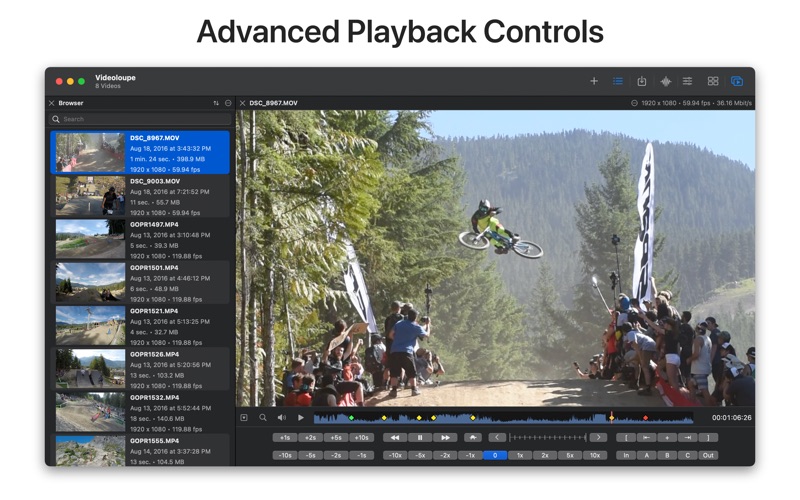
ADVANCED VIDEO PLAYBACK CONTROLS
• Frame stepping
• Rotate 180 degrees during playback for videos shot upside-down
• Bi-directional playback rates of 1x, 2x, 5x, 10x, 30x and 60x
• Bi-directional slow-motion playback rates of 1/2x, 1/4x and 1/8x
• Bi-directional and variable rate track scrubbing with trackpad gestures
• Multi-level video zooming up to 500% durive live playback
• Skip forward and Skip backwards by 1, 2 or 5 seconds
• Extensive support for keyboard shortcuts and trackpad gestures
## REQUIREMENTS ###
• OS X 10.12 is required.
* Includes TouchBar Support
• Synchronized playback performance is heavily dependent on CPU, GPU and hard disk speeds.
• Videoloupe does not include any additional video codecs other than those included with macOS.