
iPhone Screenshots





Description
Face Page Turner+ (FPT+) includes Face Scan and Voice Scan.
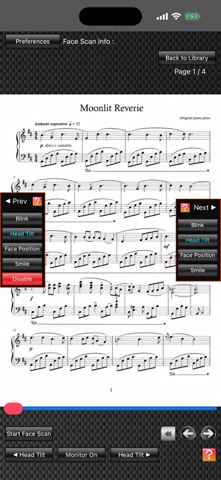
Face Scan uses the camera on an iPhone, iPad, or Apple silicon Mac (referred to below as the “device”) to detect the user’s face and turn pages of the score displayed on screen through head tilt, face position, blinking, or smiling.
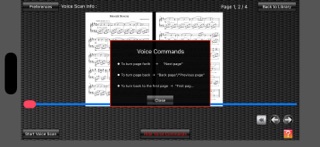
Voice Scan uses the device’s microphone to recognize three voice commands—“Next Page,” “Previous Page,” and “First Page”—and turn the displayed score pages.
In Face Scan, tapping the scan selection button opens the “Next” and “Previous” windows. You can freely assign different actions for moving forward and back, such as Smile for Next and Blink for Previous. Scanning with combinations of two actions is also supported.
FPT+ offers several ways to import music scores:
1. Photograph a printed score with the device’s camera and import it directly into FPT+.
2. Import score images through the Photo Library (Apple’s Photos app), including images captured with the Camera app or screenshots. For example, you can import a score image displayed on a music website.
3. Connect an iPad to a computer and import score image files into FPT+ through Finder. FPT+ supports JPEG and PDF files. You can also use Finder to back up score image files stored in FPT+ to your computer.
4. Import JPEG or PDF score files from compatible book-viewer and scanner apps installed on the iPad. For example, score images captured with a scanner can be imported through the scanner’s companion app.
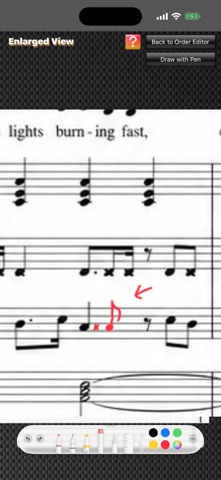
FPT+ also includes an Order Editor for changing the display order of imported score images. You can copy, cut, and paste pages, and easily reorder them by dragging images with two fingers. By duplicating pages and arranging them in advance to follow repeat markings, you can display the score in performance order using only page-forward actions.
The free version limits the number of pages and files you can use. You can use the app freely within those limits without payment. A one-time in-app purchase removes the limits.