
iPhone Screenshots






Description
Auto clips, captions & subtitles, chapters, titles + descriptions + tags, profanity censoring, resize for any platform, pixelate & watermark.
Beep is a transcript-based AI video editor that does it all in a cool way — with just a few taps. No need to hire transcribers or editors, no hassle.
Beep transcribes your video so you can cut fillers, fluff and dead air, remove any part just by tapping the transcript, generate viral hook titles, descriptions and chapters, add captions, and turn a long video into short clips.
It also detects profanity automatically and censors it for you — millisecond-accurate across 100+ languages, with no unusable AI slop.
If you swear too much on your YouTube / TikTok / Instagram videos, this is the perfect app to make them audience-appropriate!
-------------------
FEATURES:
Beep AI Censoring:
1. Censor profanity in videos automatically with AI *
2. Detect and censor swear words in 100+ languages & locales — even several languages spoken in the same video.
3. Face detection automatically covers the speaker's mouth with an emoji related to the video's content (add or change emojis yourself too).
4. Manual censoring: tap and hold to censor any area, and nudge the timing to micro-adjust.
5. High-quality bleep plus 15+ sound effects, or 'Silence' to mute.
Trim & edit from the transcript:
6. Auto-Trim Silences: remove silences and awkward pauses between speech, at no extra cost.
7. Cut out fluff, fillers & low-value content with AI to tighten your ideas and make them more watchable. *
8. Manually cut out any section by tapping directly on the transcript.
Clips Generator:
9. Turn one long video into several ready-to-post clips — AI stitches the strongest moments from anywhere in the transcript, each with its own title and angle. Perfect for Shorts, Reels and Stories. *
Captions & Subtitles:
10. Auto Captions/Subtitles: add captions to your videos at no extra cost, right after censoring.
11. Translated Captions: translate into as many languages as you like and reach a wider global audience (~180 languages). *
12. Dynamic Captions: AI enlarges the words that matter, decorates them with emojis, and can scatter them or show only the key words. *
13. Fast Reader captions: rapid, one-word-at-a-time (RSVP) captions for effortless reading.
Grow & Polish:
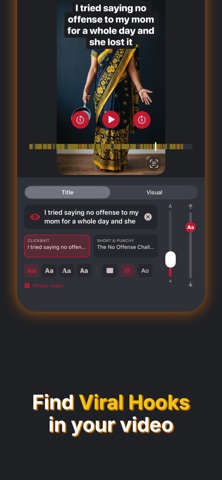
14. Title & Description Generator *: title styles (Clickbait, Short & Punchy, Listicle, POV/Trend), summarize, explain, add value, chapter timestamps and hashtags — in ~180 languages.
15. Chapters: burn chapter titles and seek markers right onto your video, with automatic step numbers for how-tos and lists.
16. Hooks: let AI stitch your most gripping moment to the very start as a teaser, and open with a bold title hook.
17. Resize for Any Platform: fit, fill or center your video for TikTok, Reels, Shorts, YouTube or a feed post, over a color or blurred background. Export in the highest quality.
Protect & Brand:
18. Watermark Placer: save multiple watermarks and reuse them on any video to keep your branding consistent. Animated watermarks make your content near-impossible to steal.
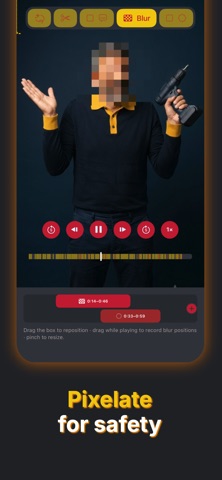
19. Blur & Pixelate: hide anything you don't want on screen — faces, logos, or private details.
Save & Resume:
20. Recent Transcripts: your video, transcript and the AI work are saved — reopen and keep editing anytime.
21: App UI in French, Spanish, Portuguese, Korean and Japanese
No Ads (we hate 'em!)
No subscriptions.
Contact Support right from the app — if you need more features, please let us know.
----------
Notes:
* Requires Sparks AI credits.
300 Sparks (AI credits) are included with the download of the app.
Introduce Beep to your followers and earn free Spark credits.
You can buy more Sparks as consumable in-app purchases.
Manual censoring is still available without needing Sparks.
Max video length: 10 min.
** Beep can detect most swear words and uses the latest technology; however, results may vary depending on factors such as audio noise and speaker accents.