
Gradient Grades – Grade Calculator
Calculate and predict outcomes
Ross Castillo
iPhone Screenshots


Description
Track current and predicted for courses. Input and assignment weights to calculate final projections. Set goals for desired and monitor progress over time. Adjust parameters as assignments and deadlines change.
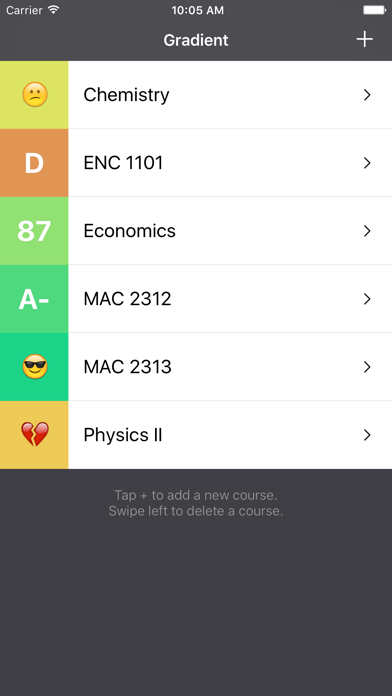
Gradient keeps track of your current and predicted grades.
Ever wonder what score you need on an exam to get an A in the class? Of course you have. Because whether you're acing a class or failing, it feels better to know where you stand. Now you can see what scores you need for the grade you want.
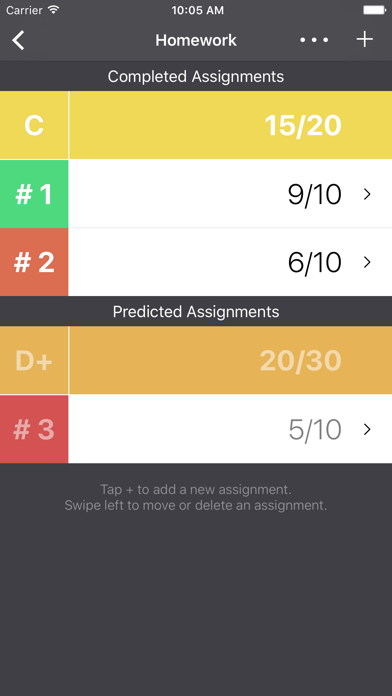
Use Gradient to record your current grades –– and predict your final grades based on assignments that you have yet to complete.
Here's how it works:
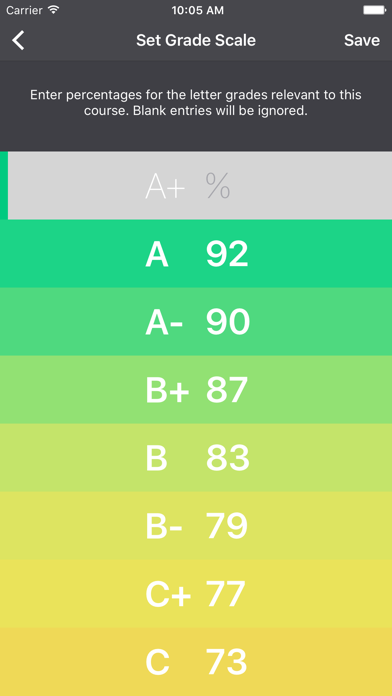
1. Set parameters for a course you want to track: things like grading scale and whether certain sections of the course are weighted differently.
2. Enter scores for assignments you've completed ... and enter predicted scores for assignments you haven't done yet.
3. As you complete coursework, mark predicted assignments as "completed" and adjust your scores accordingly.
4. Keep up with your Gradient and experiment with predicted scores. The goal is all green!
Technical mumbo-jumbo:
All grades are calculated using numbers rounded to three decimal places. The percent value shown for grades does not display decimals. This is just to save space. The values are truncated, NOT rounded. For example, an 87.4 and an 87.5 will both show up as an 87. The letter grade depends on the grade scale you set. So, if you set a B+ as an 87.5, an 87.5 would show up as a B+ and an 87.4 would show up as a B.
Please send questions, suggestions, and comments to: [email protected].