
iPhone Screenshots



Description
See your speed. Make it yours.
Speedometer puts your current GPS speed front and centre with large digits and a clean display. Use it on iPhone or iPad, or check your speed from your wrist with the standalone Apple Watch app.
YOUR SPEED AT A GLANCE
• Choose km/h, mph, knots or m/s.
• See GPS status when the signal is weak or unavailable.
• Use the iPhone and iPad display in portrait or landscape.
A DISPLAY THAT FITS YOU
On iPhone and iPad, choose from five colour themes and four digit styles. Follow your device’s light or dark appearance, or keep the app always light or always dark.
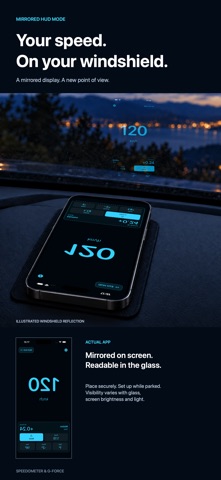
YOUR SPEED ON YOUR WINDSHIELD
HUD mode mirrors the display so its reflection in your windshield reads the right way round. Place your device securely on the dashboard with the screen facing the glass, keeping your view clear. Reflection visibility depends on the windshield, screen brightness and ambient light. Set it up while parked.
EXPLORE MOTION
On iPhone and iPad, view current and peak G-force alongside roll, pitch and yaw. Measure overall acceleration or an individual device axis. Reset the peak and orientation reference, or turn the motion panel off for a simpler speed display. Motion features require an available device motion sensor.
SPEED ON YOUR WRIST
The Apple Watch app measures speed independently of your iPhone. Choose your unit on the watch and glance at your speed while walking, running, cycling or boating.
GET STARTED YOUR WAY
An interactive introduction helps you explore the controls and personalise the display. You can revisit it from Settings. On iPhone and iPad, add a Siri shortcut for your current speed.
Speed measurement requires location access and a usable GPS signal. Keep your attention on your surroundings and adjust the app only when it is safe to do so.