
iPhone Screenshots




Description
Books in foreign languages and new words by tapping unknown terms for translations and adding them to a study deck. Supports PDF, EPUB, RTF, FB2, and TXT formats. Scan and convert foreign language documents into readable books.
Read books in any foreign language and turn every unknown word into a flashcard you'll actually remember. Version 5.0 brings a complete redesign — a calmer reader, a smarter library and a new way to study.
Polyglot Reader is your pocket library, dictionary and flashcard trainer in one app. Tap any word or phrase in a book, get an instant translation with transcription, hear the pronunciation, and save it to a deck to review later. Built for iPhone, iPad and Mac, with a refined dark theme.
— READ —
• Completely redesigned reader, bookmarks, translation popup and settings
• New System theme that follows iOS automatically, plus refined Light and Dark
• Open books in PDF, EPUB, FB2, RTF and TXT
• Import from Dropbox, Google Drive, OneDrive or any file app
• Scan a paper page — the app recognizes the text and saves it as a book
• Highlights words you don't know yet, right inside the page
• Vertical scrolling, comfortable type settings, picture zoom
— LIBRARY —
• Thousands of free classic books in 38+ languages, sorted into sections like Classics, Sherlock Holmes, Shakespeare, Horror & Mystery, Children's Books, Philosophy, Adventure
• Adapted A2–B1 readers for German learners, plus original literature in English, French, Spanish, Italian, Russian, Japanese, Chinese, Latin, Greek and many more
• New sorting, new sections and search inside every shelf
• Filter to show only recent books
• Difficulty level and tags shown right on each cover
• Drag and drop to reorganize your shelves
• New "Added manually" section for everything you imported yourself
• Smoother search, scroll and sharing on iPad
— LEARN —
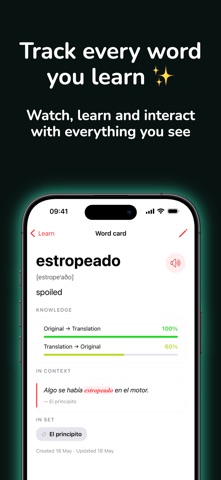
• Redesigned cards and study screens
• Ready-made flashcard sets for English, Spanish, Portuguese, Russian, Chinese and Japanese — verbs, nouns and themed categories
• Smart virtual decks: All cards, Recent, Unknown — see progress at a glance
• Quick preview and actions inside every deck
• Pick a default deck for new words you save while reading
• Per-card knowledge level with a colored progress bar (red → green as you master each word)
• Three study modes: foreign only, foreign + native, native only
• Hands-free mode — keep learning without touching the screen
• Long-press context menu: mark as known or unknown in one tap
• Optional shuffled order during study
• Filter to show only words you haven't learned yet
• Pronunciation for both the word and its translation
• Knowledge tests for every deck
• Export and import cards in CSV
— TRANSLATE —
• 111 offline dictionaries — no internet, no quota
• On-the-fly transcription for all popular languages
• Speech-to-text: just say the word, get the translation
• Translate your own phrases and add them to any deck
• Edit translations when you want a better wording
• 90+ languages supported, including Arabic, Chinese, Dutch, English, French, German, Greek, Hebrew, Hindi, Italian, Japanese, Korean, Latin, Polish, Portuguese, Russian, Spanish, Swedish, Turkish, Ukrainian, Vietnamese and many more
— AND ALSO —
• System, Light and Dark themes
• Choose Google or Yandex as default online translator
• Compact mode on iPhone, expanded card view on iPad
• Notifications to bring you back to recent cards
Whether you're reading Sherlock Holmes in English, Kafka in German, Don Quijote in Spanish or Dostoevsky in Russian — Polyglot Reader turns reading into vocabulary, one tap at a time.
Questions or feedback: [email protected]