Scan and generate QR codes and barcodes. Decode various formats including QR, Data Matrix, and PDF417. Create custom QR codes with text, URLs, or contacts. Share scanned results via email or social media. Adjust scan settings for precision.
Create isometric drawings for plumbing and mechanical designs on iPad. Use preloaded templates and drag-and-drop tools. Export designs in multiple formats. Access a 48-hour trial before subscription. Includes a two-week free introductory period.
Perform length calculations, determine fittings angles, and estimate material requirements. Access schedules, standards, and industry-specific data. Convert units and calculate pressure drops. Save and export calculation results.
Read and annotate PDF documents with highlighting, handwriting, and text insertion. Sign and fill out forms directly. Manipulate pages and export files. Sync across devices for seamless access.
Securely and sync mobile data using private key encryption for maximum security. multiple devices to a single account and access files from any device. Protect important files with end-to-end encryption and manage backups remotely.
The app provides 2,450 practice questions and two full-length mock exams aligned with the July 9, 2026 exam outline and the PMBOK Guide, 8th Edition. It offers various study modes and performance analytics to help users prepare for the PMI PMP exam.
The app allows users to edit, annotate, fill, and sign PDFs. It also enables scanning, reading, and understanding documents, with voice notes that stay on the page.
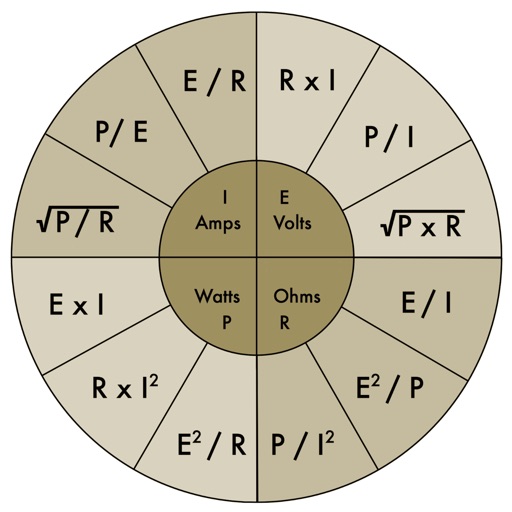
The app provides an electronic pocket reference guide for electrical professionals. It includes sections on motors, wiring, ampacities, grounding, voltage drop, conduit bending, tools, and safety.
Is a diagnostic tool for Jeep, Chrysler, and Dodge vehicles. It reads diagnostic trouble codes, live data, and adaptations. It accesses multiple vehicle modules including ABS, transmission, and HVAC.
Record messages in threaded conversations for group or individual communication. Share and reply to volleys within threads. Invite others to join discussions. Set up coaching or consulting sessions. Track conversation history and manage participants.
Edit numbers, track calculations, organize spreadsheets
Allows users to perform calculations with an editable for error correction. Input numbers and operators, edit entries, and view results. Save and share calculation history. Switch between and spreadsheet modes for different tasks.
Using a privacy-focused engine that does not collect or sell personal data. Browse the web with an integrated browser that blocks trackers and ads. Manage history and control data sharing settings directly within the .
Track expenses, scan receipts, organize business cards
Track expenses by scanning receipts, mileage, and business cards. Automatically categorize receipts into 15 tax categories. Create expense reports with attached images. Send reports directly from the . Upload and organize receipts for tax purposes.
Access emails and manage calendars from iOS devices. Read and compose emails, set calendar reminders, and sync across devices. Separate work and personal accounts within the .
Access 1,000 Security+ practice questions and three full-length mock exams. Review key concepts, track progress, and receive expert-aligned content to prepare for the Security+ exam.
Allows users to view, edit, import, and export PDF, Word, Excel, and PowerPoint files. It includes Writer for document creation and editing, Calc for spreadsheet calculations, and supports full OpenOffice functionality.