A with simple arithmetic functions. Displays calculation history. Shows current input. Features intuitive design and universal compatibility. No additional features or complex calculations included.
A calculator with a large, easy-to-read display and simple buttons. Perform addition, subtraction, multiplication, and division. Features a clear layout and user-friendly design for everyday use.
Customize appearance with themes, button shapes, and colors. Choose from six layouts and control all visual elements. View input and result simultaneously on dual-line display. Adjust settings for precise calculations.
Perform complex calculations using 10 built-in calculators including scientific, financial, and unit conversion tools. Access 10 financial worksheets for budgeting, loans, and investments. Save and share calculation results.
A a log of all calculations. Displays input equations and results clearly. Includes backspace function. Allows adjustable keyboard size and number font size. Supports customization of decimal places, font size for , and display format.
Calculator with large keys and 4 basic functions for use. Review entries using tape, add comments, timestamp, and email numbers. Bring past entries into current calculations.
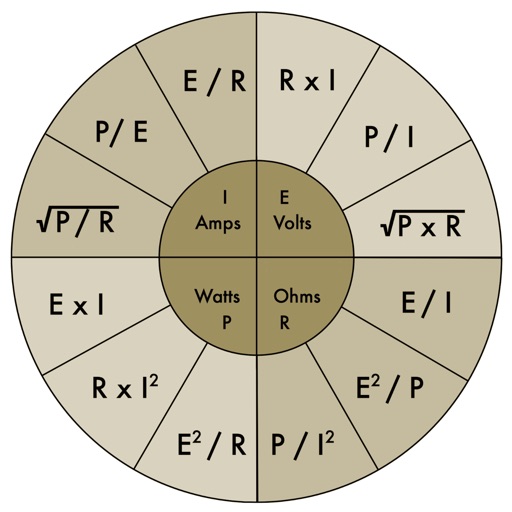
Calculate electrical values using formulas for voltage, current, resistance, power, and more. Determine wire size and voltage drop. Perform transformer and generator calculations. Convert between electrical units.
The app offers a modern calculator with extensive customization options. Users can create custom themes, choose button shapes, and adjust visual elements.
Create and manage tables with customizable columns and cell formatting. Save personal information, recipes, schedules, and timetables. Set item names and adjust text and background colors for cells.
Perform complex calculations with scientific, financial, and unit conversion tools. Access 10 financial worksheets for budgeting and planning. Switch between landscape and portrait modes. Save and export calculation results.
Calculate loads, voltage drops, and conductor sizes according to NEC codes. Verify compliance for residential and commercial projects. Access code references for 2002–2023 editions. Perform wire sizing, panel scheduling, and circuit calculations.
Calculate box fill, fill, and wire volume according to NEC standards. Input device counts, equipment grounding, and internal clamps. Access common box sizes and types for accurate volume calculations.
Calculate percentage and jam probability based on NEC standards. Input type, size, and conductor details. View percentages and determine appropriate sizes for electrical installations.
Create custom forms for data collection. Fill out forms offline and sync data when connected. Share completed forms with team members. Track form submissions and manage data entries. Export data in multiple formats.
The app provides an electronic pocket reference guide for electrical professionals. It includes sections on motors, wiring, ampacities, grounding, voltage drop, conduit bending, tools, and safety.
Create and by inputting text or images and selecting label type. Automatically adjusts content to fit label size. Sync with Mac via cloud. Supports most Avery label sheets. Organize mailing lists for recurring mailings.
Calculate and mortgage payments with customizable terms, interest rates, and frequencies. Display breakdowns of interest and principal. Estimate repayment time. Compare options. Export results via email or file. Save details for future reference.
Perform basic and complex calculations with a clean, intuitive interface. Input numbers and operators to solve equations. Switch between different calculation modes for precision. Save frequently used equations for quick access.