Documents or web pages quickly from mobile devices. Select and search for authorized printers. Restrict access to approved printing options. Connect via Mobile Connector for .
by Levi, Ray & Shoup, Inc.★ 4.58 ratingsBusinessFreeData updated 2026-09-09
Optimize restaurant prep with smart scheduling based on sales and inventory. Set prep amounts and times. Print labels via connected printers. Use timers, checklists, and custom media for operational efficiency.
Print calendars and reminders directly to AirPrint-compatible printers. Share calendar data as PDFs. View events in Day, Week, Month, or List formats. Select custom date ranges for printing.
Scan documents and photos using the device's camera. Select a from a list of compatible models. directly via AirPrint without needing additional setup. Share printed documents via email or messaging apps.
Create mailing labels from contact addresses or custom entries. Organize labels into lists and save style settings. Automatically fill fields with contact information. Print labels directly from the .
Manage 3D printer connections with OctoPrint and Klipper. Prepare prints by heating hotends and swapping filaments. Monitor print progress and control settings in real time. Sync with Bambu Lab and Elegoo printers.
PrintXpert lets users documents, photos, emails, and webpages instantly. documents from iPhone or iPad with simple clicks. Choose authorized printers by name or location. Connect to over 5000 AirPrint printers.
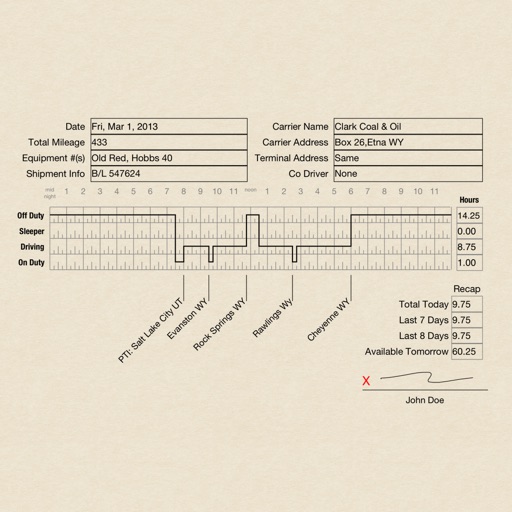
Create RODS for duty status records, sign and email them. Track driving hours, log activities, and print records. Manage logs with pages that require purchase after the first 30.
Create and print custom calendars by selecting a month and adding background images. Customize layout and export as PDF or print directly. Share calendars via email or social media.
Manage files by viewing, storing, and printing documents, emails, PDFs, photos, and web pages. Print to all printers, not just AirPrint. Convert files to PDF. Print directly from Safari, Photos, and other apps.
The app scans documents, extracts text using OCR, and allows editing and form filling. It supports sharing files via email, cloud storage, and faxing to over 100 countries.
Manage files by viewing, storing, and printing documents, emails, PDFs, photos, and web pages. Transfer files between devices. Print to all printers, including non-AirPrint models. Convert documents and images to PDF.
The app enables users to print documents and photographs from a mobile device. It allows users to read scanned data and upload it to cloud storage services.
Print documents and photos directly from an iOS device. Choose files from Dropbox or Google Drive. Customize with built-in tools. Support for 20+ file formats including PDF, DOCX, JPG, CSV, and TXT. Scan documents and photos for printing.
The app allows users to print their iPhone calendar and reminders to any printer. Users can email calendar views as PDF files and print maps with driving directions for appointments.
Edit and add filters to scanned documents before printing. Select files or scan documents using the camera. Send prints to Wi-Fi printers. Supports AirPrint. Includes built-in scanner for documents and .
Documents from photo galleries, iCloud, and web pages. Support PDF, XLS, DOCX, and other formats. Edit text and store files locally. Use AirPrint for wireless printing. Share printed files via email or messaging.
Print documents and photos directly from your phone. Send files to compatible printers instantly. Edit or scan documents within the . Support for doc, docx, pdf, jpg, and other formats. Print contacts from your phonebook.