Scan documents to create PDFs, edit text, and convert scans to editable formats. Extract text from images. Read and generate QR codes. Organize and share scanned files directly.
View crew member photos, check gate and aircraft locations, and see reformatted CCS pages. Track break times and meal indicators. Access logbook and schedule details. Export or print schedules, sync with Apple Calendar.
Track and organize receipts from paper and email. Scan paper receipts manually or import email receipts directly. Save all receipts in one centralized location. View receipt details and categorize expenses. Set reminders for expense tracking.
Scan driver's licenses using phone camera to verify validity and expiration dates. Save scan history to track attendees and generate aggregated stats. Create VIP or banned lists for event management.
Scan documents quickly with camera input, choose between black and white or color, and save as PDF or JPEG. Export files to cloud storage or email. Sign documents and extract text for editing.
Create by scanning VIN, entering vehicle details, and uploading photos. Send to bidders for competitive bidding. View vehicle condition reports and place bids in live 20-minute . Track auction status and manage bids directly.
Scan QR codes and barcodes with support for 20+ types. Use front or rear camera and torch for scanning. Scan codes from photos in the library. Generate custom QR codes. View product details from Google and Amazon. Save and filter scan history.
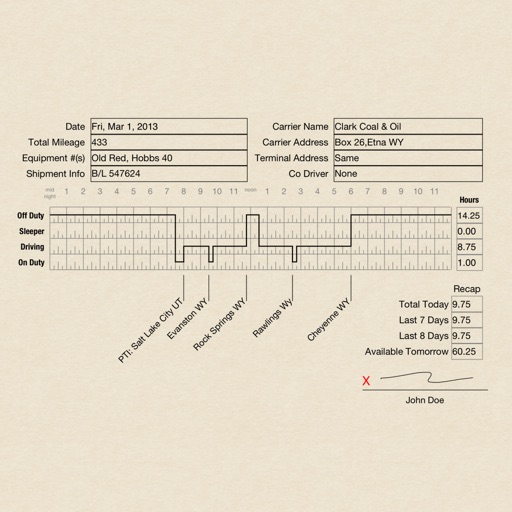
Create RODS for duty status records, sign and email them. Track driving hours, log activities, and print records. Manage logs with pages that require purchase after the first 30.
Scan QR codes quickly with auto detection and rapid scanning. View scan history, export data as CSV, and batch scan multiple codes. Access privacy policy and terms of service.
Documents, photos, receipts, or other materials into clear, sharp images or PDFs. Correct perspective, remove shadows, and adjust colors. Save, email, print, or cloud-store scans. Combine multiple scans into one PDF using batch mode.
Scan QR codes and barcodes to access text, URLs, ISBNs, contacts, emails, locations, and Wi-Fi networks. Share scanned data via email or messaging. Save scanned results for later reference.
Scan and archive cards using OCR technology. Extract contact information including name, title, phone number, and email. Save contacts to device or cloud. Search and organize saved contacts. Share contact details via email or messaging.
Book for homes, Airbnb properties, offices, and common areas. Schedule cleanings, customize checklists, and connect with verified cleaners. Receive updates and manage reservations through the .
And store ID cards, passports, and other identification documents. Edit, annotate, and organize scanned files. Share documents securely via email or cloud services. Manage digital files with folders and search functionality.
Convert documents to PDF by scanning with the phone's camera. Automatically detect and correct page edges for straight alignment. Choose full-color, grayscale, or black-and-white scan modes.
Documents and business cards by taking photos. Edit scans with cropping, rotation, and color adjustments. Convert text to speech and use OCR for text extraction. Export as searchable PDF or DOCX.
Scan and convert paper documents, receipts, invoices, and certificates into digital files. Automatically crop and enhance text and graphics for clarity. Export documents in high quality formats and share them directly.
Create and manage invoices, quotes, and sales orders. Track payments and send reminders. Generate reports on unpaid invoices and sales. Email, print, or fax documents directly. Send client statements and recurring invoices.
The app transforms an iPhone or iPad into a portable scanner. It converts notes, documents, and receipts into PDF files with automatic border detection and image processing.