Edit photos with AI-powered enhancements, smart filters, and automatic adjustments. Crop, rotate, and adjust brightness and contrast. Add text, stickers, and frames. Export in high resolution and share directly.
Redesign rooms using AI-generated suggestions. Upload or capture photos of spaces. Choose from various styles. Receive detailed alternatives. Adjust layouts and color schemes. Export or share concepts.
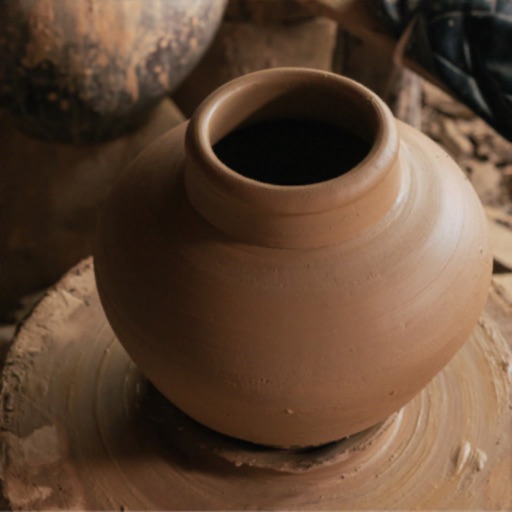
Create by dragging and molding the shape. Bake the pot to prepare for design. Add colors, patterns, and stamps to customize the artwork. Save finished creations to the device gallery.
Create and edit digital art with layers, brushes, and customizable tools. Import and export files in various formats. Access cloud storage for file syncing. Subscribe for additional features and materials. Save and export work after trial period.
Create and customize without needing Robux. Design girl, boy, PVP, Minecraft, anime, hero, mob, or other character . Modify existing or start from scratch. Export and use directly in .
Design with precision, edit vector graphics, create
Create illustrations, branding, logos, and UI/UX designs. Edit vector graphics and raster images. Apply filters, adjust colors, and add text. Export in multiple formats and share directly. Sync with desktop versions for seamless workflow.
The app offers a digital coloring experience with over 120 free animal pictures. It features a stay-in-line brush, nine brushes for painting and drawing, and 50 pattern brushes for a unique coloring book and drawing pad.
Create objects with customizable shapes and textures. Choose colors and glazes for each piece. Save and view completed works. Listen to calming sounds and music. Adjust workspace settings for personalized experience.
Create digital art with 105 tools including pens, pencils, and brushes. Import and edit photos. Add text and rotate elements. Customize brush settings. Use customizable canvases. Save and share artwork.
Teach children to shape clay into balls, sausages, and figures. Create characters through modeling and animation. Includes color options and interactive crafting features to encourage creativity and fine motor skills.
And customize ponies with 5 different characters. Choose hairstyles, colors, and accessories. Add stickers, hairspray, and nail varnish. Take photos, animate ponies, and apply special effects. Watch dance moves and unique animations.
Create and construct virtual homes from scratch, building everything from simple cottages to grand mansions. Design exteriors and interiors, add furniture, and customize decor. Simulate real-life construction steps including framing and finishing.
Create and customize using 20 musical scales and 12 key signatures. Adjust 7 octave ranges and use 3-finger controls for playback. Share or save creations. Generate original tracks or follow pre-made examples.
Create animations by drawing frames and applying motion effects. Use pre-designed templates to start projects. Export animations in video format and share via social media or email.