Design circuits, simulate logic, test configurations
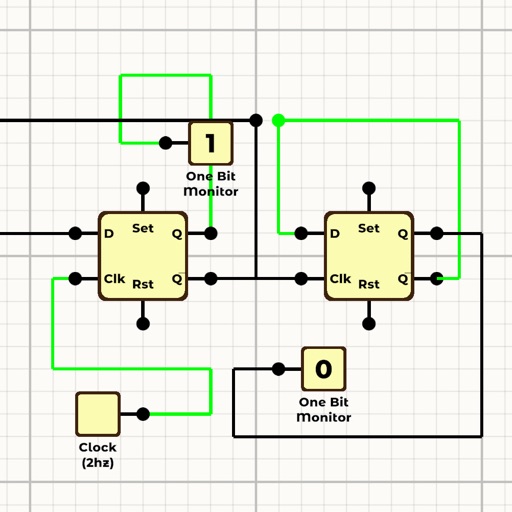
Design and simulate logic circuits with drag-and-drop components. Connect inputs and outputs to test behavior. View real-time simulation results and adjust parameters dynamically. Save and export designs for further analysis.
by Ali Mert TUFEKCI★ 2.01 ratingsUtilitiesFreeData updated 2026-09-06
Monitor vehicle health with real-time diagnostics. Inspect ignition, exhaust, and electronic systems for faults. View fault codes with three severity levels. Clear stored fault codes from the ECU. Analyze driving patterns to improve efficiency.
The app generates periodic signals with adjustable frequency and amplitude for testing electronic circuits. It also includes a tuner for instruments and a metronome for practice.
Access electrical wiring diagrams for switches, fans, and outlets. Calculate grounding conductor sizes. View diagrams for 3-way switches, 4-way switching, GFCI, and more. Includes NEC 2014 to NEC 2023 standards.
Set countdowns, stopwatches, and HIIT timers for cooking, exercising, studying, or working. Customize durations and intervals. Track time with a simple interface. Sync across devices.
Calculate electrical circuit values by entering two known variables (current, resistance, voltage, or power). Adjust units dynamically for accurate results. Display total resistance and power in the circuit.
Allows users to calculate resistor values using color codes and SMD codes. It includes tools for Ohm's Law, reactance, resonance, and voltage dividers. Users can determine resistor ratios, series/parallel combinations, and LED resistor needs.
Design and track personalized with . Create routines with timed intervals, reps, or AMRAP blocks. Sync with Apple Watch for real-time guidance. Use text-to-speech and audio cues for motivation. Log and view progress metrics.
Calculate component values for desired corner frequency, resistance, capacitance, or inductance. Find combinations of resistors, capacitors, and inductors. View detailed calculations and formulas. Export results. Remove ads with PRO version.
Display animations with customizable themes like bubbles, water waves, and circuit boards. Activate animations automatically when without opening the . Choose from multiple visual effects and set preferences through the setup.
Performs basic arithmetic and scientific calculations. Save equations and results for later. Unit Converter converts units for area, length, temperature, and more. Includes tools for currency exchange, date calculations, and percentage computations.
Perform complex number calculations and trigonometric functions. Handle matrix operations and numerical root finding. Calculate integrals and statistical values including linear regression. Write and execute custom programs. No ads or in- purchases.
Practice hand, health, head, kaya, bandha, and bharatanatyam . Select from six categories. Learn about their benefits for fitness, skin, hair, and energy balance. Follow step-by-step instructions for each gesture.
The provides scientific calculations, unit conversion, and logic-based computations. Users can switch between modes. It includes a built-in manual for operation guidance. Perform n-base conversions and unit-based calculations.
Create games on without . Design platformers and RPGs. Import assets, test in real-time, and publish to the Hub or Store. Build interactive stories and iOS apps. One-time purchase. No required.










![Mudras [YOGA] app icon](https://is1-ssl.mzstatic.com/image/thumb/Purple126/v4/20/49/90/2049909e-6c79-cd02-ea83-42a92ffd5d70/AppIcon-0-0-1x_U007emarketing-0-0-0-6-0-0-sRGB-0-0-0-GLES2_U002c0-512MB-85-220-0-0.png/512x512bb.jpg)

