Transfer photos to Bluetooth speakers by selecting and adjusting images within the . Sync photos directly to the speaker display for real-time playback.
by Shenzhen Rubyoung Technology Co., Ltd.★ 0.00 ratingsUtilitiesFreeData updated 2026-09-06
Control volume, LED lights, and input sources for compatible speakers. Connect two units via TWS. Adjust equalizer settings. Browse and save radio stations. Manage playback and source selection.
Allows users to transfer files between devices by selecting and moving files with simple taps. It supports documents, photos, and videos. Users can securely without manual effort.
Control music playback, adjust volume, and manage equalizer settings. Change light modes, brightness, and flash settings. Access USB/SD card and FM functionality. Manage line-in input and control speaker settings remotely.
Stream via Bluetooth, AirPlay, or headset. Search for and create playlists. Shuffle playback and access unlimited library. Import and manage favorite tracks.
Boost phone and tablet for media playback. Apply bass and 3D virtualizer effects. Use 10-band equalizer with 20+ presets. Enhance audio output for headphones, Bluetooth, and speakers without degrading sound quality.
Locate Bluetooth using Apple . View approximate location on a map. Connect to via Bluetooth. Play sound to help lost gadgets. Sync with Apple Health for device tracking.
Stream music from Internet radio or music services. Control playback across multiple rooms. Play the same song in all rooms or different songs in separate rooms. Add speakers to expand sound coverage.
Control lights, appliances, and view visitors remotely
Control home devices with one tap to turn on lights and appliances. View who is at the front door. Integrate with Echo speakers for voice-activated appliance control.
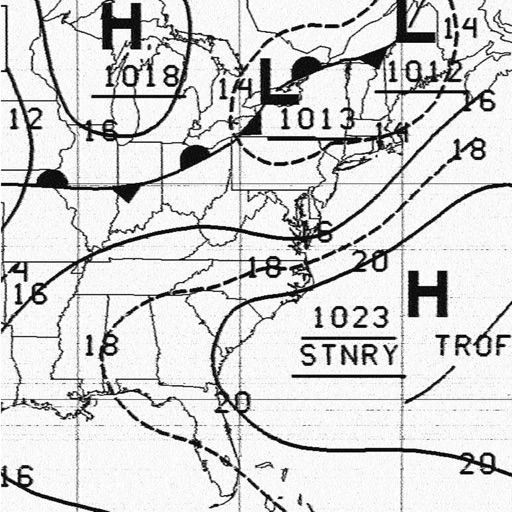
Receive and display marine fax images using HF radio audio. Connect via Bluetooth or audio input. Tune to fax frequencies. View real-time reports without internet.
Test phone speaker performance by playing a steady tone. Assess sound clarity, resonance, and output consistency. Adjust volume and frequency settings for accurate evaluation. Save test results and compare audio quality across devices.
View and organize photos and videos in a unified interface. Browse, zoom, and share media directly. Apply filters and edit images. Securely store content with password protection. Sync across devices and manage albums.
Use iPhone as a microphone for speakers. Play songs for karaoke. Add voice filters and enable noise reduction. Unlock premium features with subscription. Share audio through connected devices. Adjust microphone settings for echo removal.
Use your device as a live microphone to amplify your voice. Connect via Bluetooth, AirPlay, or cable to any . Tap the screen to activate or deactivate the audio output. Works in the background and when the screen is locked. No setup required.
Set prayer times for daily prayers. Play athan audio through connected speaker. Sync with calendar for reminders. Share prayer schedules with family members. Adjust volume and playback settings.
Generate tones between 50 Hz and 30,000 Hz for testing or tuning. Track environmental noise levels and detect harmful sound pressure. from phone speakers using sound waves to restore sound clarity.
Create synchronized effects by analyzing music rhythms. Adjust patterns based on selected tracks. Sync with multiple devices to play music and display videos simultaneously. Connect flashlights and smartphones to generate custom party lighting.
Clean speakers and headphones using sound waves to remove dust and moisture without disassembly. Perform automatic or manual cleaning with scheduled reminders. Conduct basic sound tests to check speaker functionality.
AudioTools offers SPL measurement, RTA analysis, FFT visualization, and speaker polarity testing. Includes a generator, scope, CLF viewer, and recorder. Allows adding optional modules for advanced acoustic analysis and customization.