The app allows users to design spreadsheets for planning, organizing, or analyzing data. Users can add labels, numbers, and functions to cells, and perform calculations.
by JOhn Lyons★ 1.01 ratingsProductivity$2.99Data updated 2026-10-14
Write calculations directly on the screen for real-time results. Edit equations with gestures or add elements anywhere. Drag and drop previous results for reuse. Supports interactive ink for natural handwriting input.
Calculate logarithms with customizable bases including e, 2, 10, or any specified value. Input a number and base to get the result. Display the calculation steps and save results for reference.
Allows users to take photos of math problems and receive step-by-step solutions. It can plot graphs of equations. Users can chat with an AI tutor for homework and assignment .
The app allows users to manage their finances, including checking balances, viewing activity, paying bills, and transferring funds. Users can also find nearby locations and ATMs, with mobile data transmission secured by 128-bit SSL.
Create and manage tables with customizable columns and cell formatting. Save personal information, recipes, schedules, and timetables. Set item names and adjust text and background colors for cells.
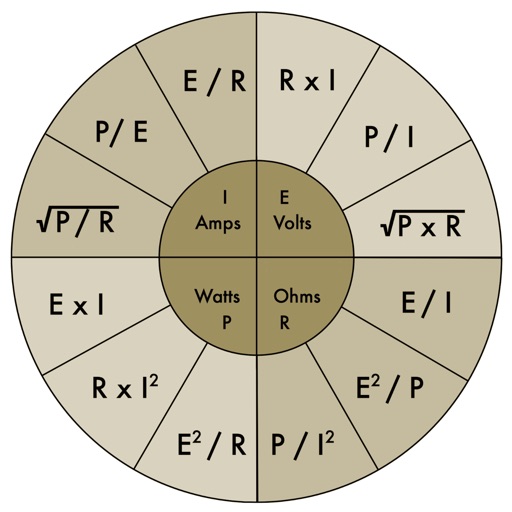
The app provides an electronic pocket reference guide for electrical professionals. It includes sections on motors, wiring, ampacities, grounding, voltage drop, conduit bending, tools, and safety.
SFX- performs basic arithmetic operations and allows calculations with a fixed constant. It includes non-volatile and volatile memory storage. It supports fraction and percentage calculations, linear regression, and statistical functions.
Perform calculations with a simple or interface. Solve equations step by step and view detailed explanations. Access calculation history for review or sharing. Generate graphs for visual representation of equations.
Make deposits, check balances, transfer funds, send
Check account balances and review transaction history. Transfer funds between accounts. Locate nearby branches and ATMs using real-time location services. Deposit checks by photo. Send money to contacts. View account details and activity logs.
Calculates with multiple modes and customizable settings
The app provides multiple calculation modes for various mathematical tasks. The app includes customizable interfaces and widgets for convenient use across devices.
Count white blood cells using touch and count modes. Set thresholds for notifications at 100, 200, 500, and 1000. Adjust total count by including or excluding nRBC. Calculate cell numbers based on proportions.
Monitor accounts, review transactions, and check balances. Deposit checks via photo, pay bills, and make transfers. Find nearby branches. Send and receive money using Zelle®. Access with passcode, touch ID, or face ID.
Create spreadsheets with touch-based data entry and formula creation. Calculate values, visualize data in charts, and export reports as PDF. Define custom functions for advanced data analysis. Set up templates and manage multiple worksheets.
Create and manage tables with unlimited folders. Add, copy, and duplicate rows and columns. Customize cell properties including color, font, and alignment. Perform batch operations like sorting, deleting, and searching.