Perform complex number calculations and trigonometric functions. Handle matrix operations and numerical root finding. Calculate integrals and statistical values including linear regression. Write and execute custom programs. No ads or in- purchases.
by Greg Hewgill★ 4.3228 ratingsUtilitiesFreeData updated 2026-09-08
Perform complex calculations using algebraic expressions and programmable functions. Support unit conversions and attached units. Save and recall variables. Run scripts and access a comprehensive mathematical library. Export results and history.
Perform complex calculations using Reverse Polish Notation. Access over 96 functions including financial, scientific, and engineering operations. Store and recall values. Switch between decimal and hexadecimal modes.
Perform calculations with a freeform canvas and responsive results. Link numbers for instant updates. Calculate tips and discounts. View full history with clear formatting. Adjust settings for precision and layout.
The app offers a scientific calculator with complex number support and programmable keys. It includes graphing capabilities for up to nine equations, vector and matrix calculations, and a unit converter for various measurements.
Perform complex calculations with support for hexadecimal, octal, and binary. Use RPN mode and multi-line display. Access unit conversions, constants, and scientific notation. View a paper tape and use multiple undo/redo functions.
The app offers standard, scientific, statistical, and date math calculator functions. Users can scroll through operations, make changes with instant results, and save formulas or history.
Perform calculations with math functions and trigonometry. Switch between units like feet, inches, yards, and metric. Visualize measurements and fractions. Track projects with customizable templates. Export results in various formats.
Solve math problems step-by-step with detailed explanations. Input equations to see solutions. Learn algebra, functions, fractions, and graphs. Verify answers and track progress. Supports multiple math topics including linear and quadratic functions.
Perform complex calculations with scientific formulas and unit conversions. Access calculation history via Spotlight and 3D Touch. Use widgets for quick access and history integration. Sync with Apple Watch for notifications and basic calculations.
Solve math problems from basic arithmetic to advanced algebra. Perform exact fraction calculations and store unlimited variables. Create custom functions and graph equations. Use a powerful algebra engine for precise results.
Perform basic and calculations including trigonometric and inverse trigonometric functions. Use mathematical functions like absolute value, ceiling, floor, and rounding. Modify calculations in real time by clicking steps.
Perform complex mathematical calculations with up to 15 digits of decimal precision. Handle large numbers without ellipsis. Save and reuse calculation equations. Access calculation history even after closing the .
Learn number recognition, sequences, and basic addition through interactive activities. Explore quantity concepts and numerical patterns. Complete challenges to reinforce math skills. Sync progress across devices.
The app provides an electronic pocket reference guide for electrical professionals. It includes sections on motors, wiring, ampacities, grounding, voltage drop, conduit bending, tools, and safety.
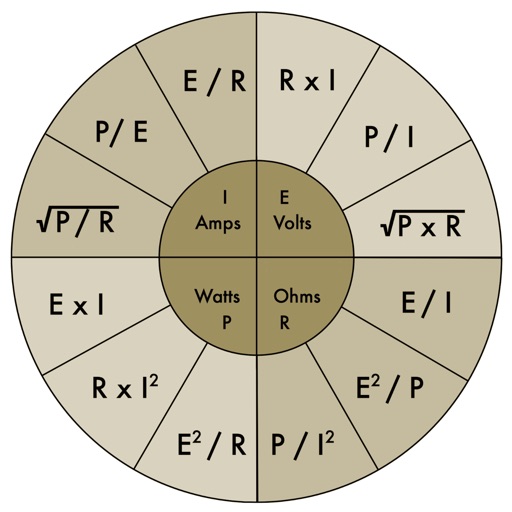
Calculate electrical values using formulas for voltage, current, resistance, power, and more. Determine wire size and voltage drop. Perform transformer and generator calculations. Convert between electrical units.
Perform complex calculations with scientific functions, trigonometry, and unit conversions. Customize themes, adjust display settings, and save frequently used formulas. Export results and share calculations directly.
Calculate bends, mark measurements, track progress
Calculate bends with step-by-step guidance for offset and rolling offset types. Input measurements to determine bend angles and lengths. Include diagrams for visual reference. Export bend data for use in installations.
Graph equations and calculate advanced math functions
Graph functions with support for multiple equations and color differentiation. Plot up to ten functions simultaneously. Use touch gestures to zoom and trace graphs. Perform calculations using natural textbook notation and advanced math commands.
Calculator++ allows users to input data via "Add X," "Add Y," and "Add Z" buttons. It calculates sum, mean, standard deviation, quartiles, and more. Results are displayed in a table. Box and whisker plots and histograms visualize data.