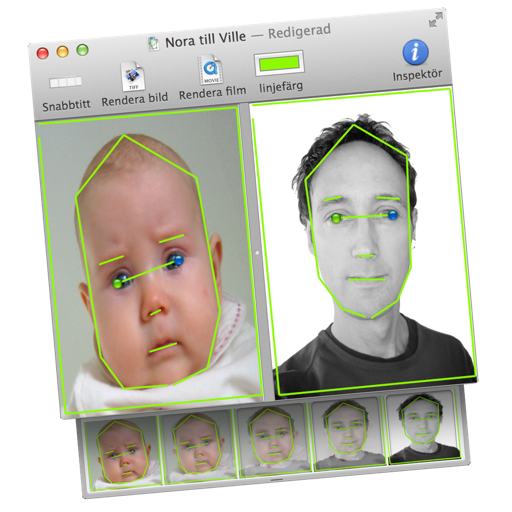
Transform images or videos by dragging two images into the document. Define similar areas with lines to create morphed transitions. Save results as still images or animated QuickTime movies.
by Martin Wennerberg★ 0.00 ratingsPhoto & VideoFreeData updated 2026-09-06
Edit photos with -swapping technology for realistic results. Apply creative templates for themed appearances. Convert images into 3D or toy-style renderings. Save edits in high definition and share directly.
Edit photos to create blurry wallpapers. Adjust and crop by dragging horizontally. Use bright, colorful images for vibrant results. Include built-in photos and shake device for new ones. Save and set as directly from the Photos .
Take screenshots with customizable hotkeys. Edit images directly with built-in tools. Save and organize screenshots for later reuse. Adjust settings to manage screenshot preferences.
Enhance clarity with AI-based unblurring. Adjust sharpness, brightness, and contrast. Remove noise and artifacts. Export enhanced images in various formats. Share directly or save to device.
Edit photos by selecting from the gallery or capturing new ones. Apply various frames and effects. Adjust position, size, and angle. Save, share, or upload images to social media platforms like Facebook and Twitter.
Monitor IP cameras with live view and background recording. Take snapshots to save in Pictures. Record MP4 videos to Movies folder. Access camera feeds via Safari, Chrome, Firefox, or Opera.