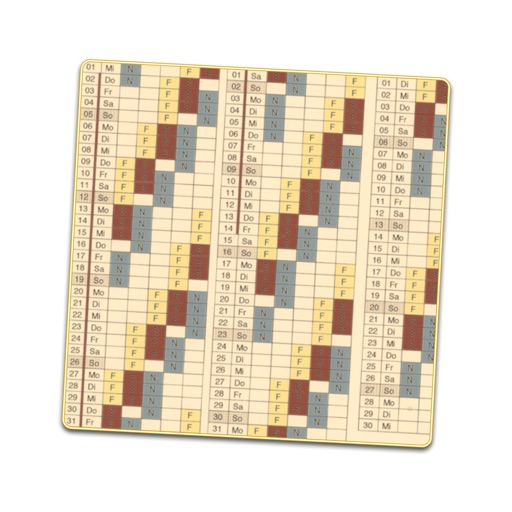
The app displays a full year with week numbers, weekdays, months, and Swedish holidays. Users can swipe or tap to change the year and tap a month to view its specific holidays.
by Near Singularity AB★ 0.00 ratingsProductivity$0.99Data updated 2026-09-16
Hefei Single Machine Placement Technology Co., Ltd.
Encrypt connections and protect data
Securely encrypt internet traffic to hide online activity. Connect to global servers in America, Europe, and Asia. Tap to activate protection against cyber threats. Switch servers by selecting flags.
Remind users of holidays, birthdays, and events. Create custom reminders. Display school holidays. Show month history and origin. Include a world clock, calculator, alarm, to-do list, local time, and translator.
Manage daily tasks and long-term plans with a customizable . Add events, reminders, and notes. Highlight important dates and mark holidays. Sync across devices using iCloud. Customize layouts and week numbers.
Connect to a worldwide server with one click. Use a simple, intuitive interface to manage connections. Encrypt internet traffic with a no-log policy. Ensure and secure browsing anywhere.
View calendar events in day, week, mini-month, or year views. Add, edit, and delete events. Set reminders and recurring options. Sync with iCloud, Exchange, or Google calendars. Customize event colors and labels. Share events via email or messaging.
Creates a displaying work shifts for each day of the year. Enter sequences and start dates to generate the schedule. Edit individual days to adjust shifts or mark as holidays. Includes public holidays and school vacations for over 30 countries.
A perpetual calendar displays current and next year's dates. Navigate years with buttons. Switch week start day between Sunday or Monday. Highlight today's date. Show weekly numbers and yearly progress percentage.
Countdown to events, birthdays, concerts, and holidays with auto reminders and a planner. Track countdowns with configurable units and Instagram-style filters. Sync Facebook events and set visual reminders.
Manage events with customizable colors and labels. Set start day and year. Display holidays and days off with color coding. Use Rokuyo support and 24-hour time format. Add event labels with adjustable font size and color.
Upload documents and scan them for notarization. Take a photo of your ID and answer security questions. documents legally and securely from any iPhone or iPad. Available 24/7 for users in the U.S. and abroad.
Use the to connect to a VPN with one tap. Browse the internet privately and securely. Protect data on public WiFi. Access the same account across multiple devices. No registration or login is required. No user logs are saved.
Track upcoming events and to dates like birthdays, holidays, and vacations. Set alerts for individual events or streaks. Add notes and sort events. Choose background from photos or select from themed backgrounds.
Displays Western and calendars. Toggle between dates for fortune-telling. Swipe left to view last month, right to view next month. Tap "weak area" to return to the current month.
View schedules as timelines with fluid navigation and contextual views. Edit calendars intuitively with enhanced tools. Suggest and vote on new features. Customize themes and fonts for personalized appearance.
Manage work schedules by adding custom shifts and tracking holidays. Set vacation days and view views. Adjust work shifts and receive alerts for upcoming tasks. Sync with business calendars and export schedules.
Count down to events and dates. Track specific dates. View upcoming holidays and birthday reminders. Set expiration dates for food and items. Receive alerts for countdowns and reminders.
Manage work schedules with customizable shift views and editing. Track shift swaps, notes, and holidays. View schedules for multiple years. Support shift work professionals like firefighters and EMS. No subscription required.