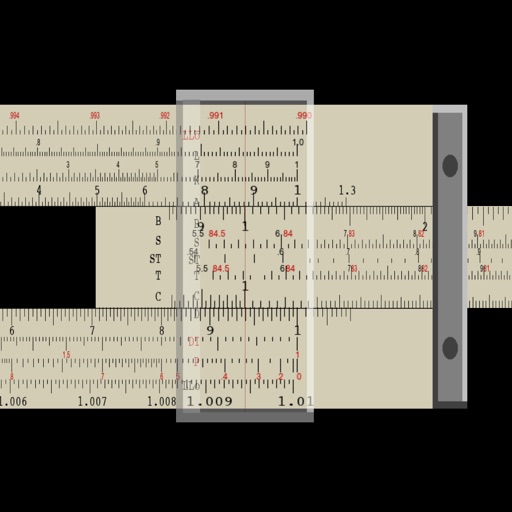
The app simulates a mechanical analog computer used for scientific calculations. It performs multiplication, division, square, cube, square root, and cubic root functions.
by 正行 Akamatsu★ 1.01 ratingsProductivity$0.99Data updated 2026-09-10
Perform multiplication, division, logarithmic, and trigonometric calculations using a slide rule interface. Adjust scales for precise measurements. Manual operation requires sliding components to compute results.
Calculator provides basic and scientific calculation functions. Users can access a history of past calculations for review or reuse. It includes a live currency converter for exchange rate checks.
Perform basic calculations in portrait mode and scientific calculations in landscape. Use root, power, factorial, exponential, division, logarithm, and trigonometric functions. Features a flat UI design similar to built-in iOS apps.
Perform complex mathematical calculations using scientific functions and simple arithmetic. Calculate percentages, taxes, and financial figures. Save and share results with others. Syncs with iPad and iPhone.
Perform calculations a scientific featuring pi, exponents, square root, negative numbers, and logarithms. View calculation and adjust decimal places or use thousands separators. Customize keyboard colors and sounds.
Perform basic arithmetic operations including addition, subtraction, multiplication, and division. Access scientific functions for advanced calculations. Convert units between different measurement systems.
A with basic arithmetic functions and a history bar for tracking previous inputs. Supports rotation and theme customization. Includes haptic feedback for 7 and later. Loads quickly and runs without fullscreen ads.
Solve problems by taking photos. View detailed solving steps. Perform addition, subtraction, division, and multiplication. Support 12 significant digits. Switch between landscape and portrait mode. No ads.
SFX- performs basic arithmetic operations and allows calculations with a fixed constant. It includes non-volatile and volatile memory storage. It supports fraction and percentage calculations, linear regression, and statistical functions.
Allows users to perform complex calculations with a natural display that shows expressions as written. It supports fractions, roots, and exponents. The includes a graphing module for visualizing equations.
MyCalc offers basic and scientific calculation functions. Users can switch between portrait and landscape modes. It supports currency and unit conversions. Results, equations, and conversions can be copied, shared, or saved.
Perform calculations with a simple or interface. Solve equations step by step and view detailed explanations. Access calculation history for review or sharing. Generate graphs for visual representation of equations.
The app offers a classic slide rule experience with precision and educational features. Users can learn calculations through an auto-slide-rule mode and select from 19 basic operations, including multiplication, division, powers, and logarithms.
Solve equations and graph functions with advanced math support. Perform calculus operations and matrix calculations. Access detailed tutorials and a comprehensive user manual. Export results and share calculations.
Perform general calculations including addition, subtraction, multiplication, division, and square roots. Use memory functions for storage and retrieval. Apply thousands separators and handle numbers up to 60 digits.
Perform calculations with addition, subtraction, division, and multiplication. Calculate powers, roots, and percentages. Use dark mode, split view, and portrait/landscape orientation. Copy results by pressing and holding numbers.
Offers standard and advanced math functions including percent, negative sign, memory, brackets, and history. It includes trigonometry, roots, exponents, and logarithms.
Allows users to perform basic and scientific calculations. It supports arithmetic operations, square roots, percentages, and trigonometric functions. Users can edit expressions with a movable cursor and view calculation history.
The app offers two modes: portrait for basic calculations and landscape for scientific functions. Users can track entries with multiple tapes and use memory slots for complex calculations.
Simulate the HP-34C calculator with photo-realistic graphics. Perform integration and root finding calculations. Access extended functions and improved speed. Navigate using on-screen buttons and keyboard input. Save and recall values.