Turn iPhone into a storage device for managing local and files. Access Google Drive, Dropbox, OneDrive, and iCloud for synchronization. Transfer files wirelessly via Wi-Fi and share them directly.
The app allows users to import documents from cloud drives and web browsers, then manipulate PDF pages. Users can merge, reorder, insert, and delete pages, as well as convert Office documents to PDF.
Calculate PPI by inputting screen dimensions and pixel count. Explain PPI vs DPI and dot pitch. Provide formulas and resolution categorization. Include definitions and user comments on related terms.
Manage with playback of audio and video formats. View and edit text documents. Perform copy, cut, paste, rename, and delete actions. Chat privately without internet. Track GPS locations to find people in offline environments.
The app extracts RAR and Zip files from mail, Safari, and other applications. It supports multi-level folders, file management operations, and searching for files.
Hide photos, , and files with a password-protected . Access hidden content by shaking the device after entering a password. Use a standard interface to conceal the 's true function. Store and retrieve files securely without visible indicators.
Create and edit PDF documents with ink annotations using Apple Pencil. Add notes, highlight text, and sign documents. Share files with colleagues or students. Review and annotate PDFs for study or work.
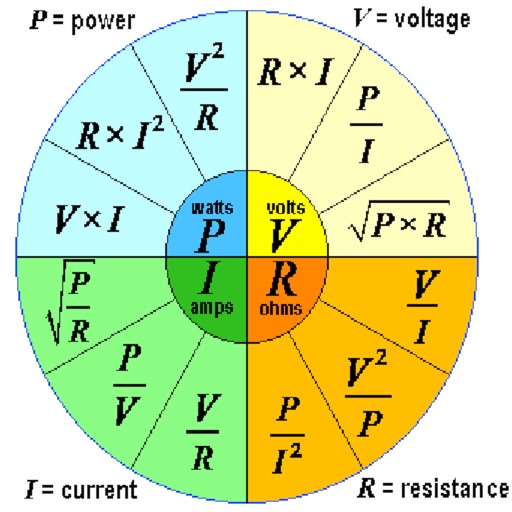
Calculate voltage, current, resistance, or electric power by entering any two values. Convert results between normal and scientific notation. Display calculated values clearly.