Perform calculations in standard, scientific, and programmer modes. Calculate totals and taxes. Switch between portrait and landscape layouts. Support multitasking and slide-over on iPad. No ads.
by Philip Symons★ 5.02 ratingsUtilitiesFreeData updated 2026-09-06
With symbolic algebra, equation solving, and calculus functions. Supports fractions, repeating decimals, and high-precision numbers. Displays results as simplified expressions or numerical values.
Perform complex mathematical calculations with up to 15 digits of decimal precision. Handle large numbers without ellipsis. Save and reuse calculation equations. Access calculation history even after closing the .
The app offers a free basic and scientific calculator with an intuitive interface. It displays equations and results simultaneously, supporting fractions and percentages.
A calculator with Basic and Scientific modes supports numbers and trigonometric functions. Perform quick calculations, access advanced operations, and view computation history. Generate random numbers with uniform distribution.
The app provides two calculators: one using Standard Notation and another using Reverse Polish Notation. Both calculators are programmable and include finance and scientific functions, plus 45 physical constants.
Perform basic math operations including addition, subtraction, multiplication, division, and percentage. Store and retrieve calculation results. Customize number, operator, parenthesis, and result colors. Enable touch sound for feedback.
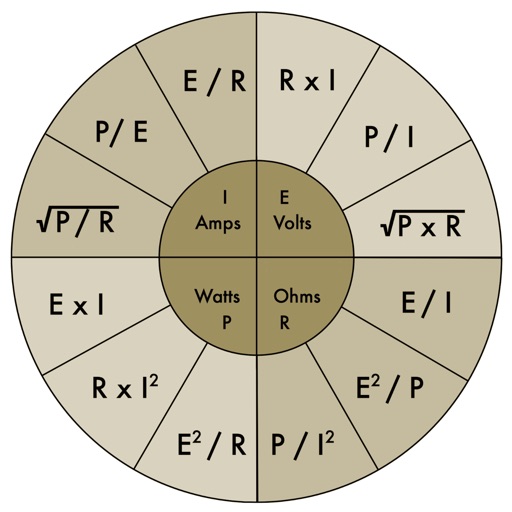
The app provides an electronic pocket reference guide for electrical professionals. It includes sections on motors, wiring, ampacities, grounding, voltage drop, conduit bending, tools, and safety.
Calculate tips and split bills with customizable percentages and group allocations. Enter total amounts and split costs evenly or manually. Round total values for easier handling. Share results via copy or email.
Perform complex calculations using ten built-in calculators. Access ten financial worksheets for budgeting, loans, and investments. Input formulas, view results, and save calculations. Export data as PDF or text. Switch between light and dark modes.
A with simple arithmetic functions. Displays calculation history. Shows current input. Features intuitive design and universal compatibility. No additional features or complex calculations included.
Performs basic and scientific calculations. View and share calculation history. Switch between landscape and portrait modes. Choose from customizable themes to personalize the interface.
The app calculates linear measurements, areas, volumes, and weights in US and metric units. It supports decimal or fractional notation and includes unit conversion, memory, rounding, and percentage functions.
Calculate measurements in feet, inches, and fractions. Convert between units and perform complex calculations. Store frequently used values and recall previous entries. Adjust for slope and pitch. Export results to email or cloud storage.
Perform complex calculations with customizable formulas and equation solving. Save and reuse calculations. Convert units and manage multiple profiles. Export results and access advanced functions like matrix operations and statistical analysis.