Manage print jobs by releasing them from a mobile device. Select authorized printers by name or location. Print documents or web pages quickly. Print multiple copies. Restrict access to approved printers.
by HP Inc.★ 2.125 ratingsBusinessFreeData updated 2026-09-23
Turn your device into a mobile printing tool. documents, photos, emails, and web pages. Supports multiple wireless printers. Preview files before printing. from cloud storage or local files. Features an easy setup and intuitive interface.
Print documents and photos from various file types. Merge PDFs and scan documents directly. Print wirelessly to connected printers. Save and share files via cloud services. Manage print jobs and view scan history.
Documents and photos in various formats including PDF, DOC, and JPG. Connect to Wi-Fi printers without drivers. paper documents and them directly. Edit text with a built-in editor and as professional documents.
Documents, cloud files, web pages, emails, and photos directly to any network or WiFi printer. Support drag-and-drop from other apps for printing, exporting, and PDF conversion. via Mac/PC to USB and Bluetooth printers without needing a computer.
View and edit PDF files on mobile devices. Annotate, fill, and sign forms. Share files directly. Access and manage documents remotely without needing printed copies.
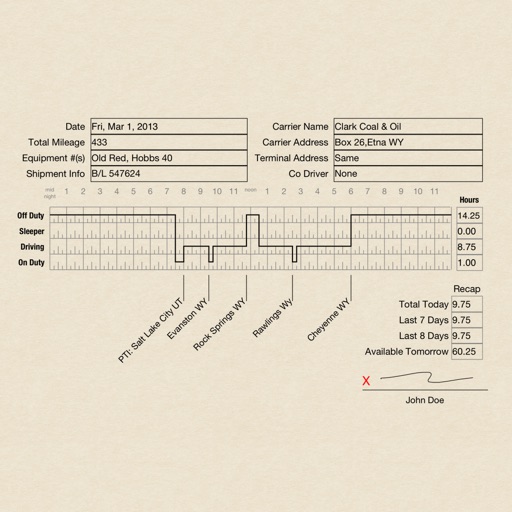
Create RODS for duty status records, sign and email them. Track driving hours, log activities, and print records. Manage logs with pages that require purchase after the first 30.
The app enables users to print documents and photographs from a mobile device. It allows users to read scanned data and upload it to cloud storage services.
Print documents from Mail, Safari, and Notes by copying and pasting content into the . Print photos, contacts, and web pages. Unlock full features with an in- purchase to remove print restrictions.
Print calendars and reminders directly to AirPrint-compatible printers. Share calendar data as PDFs. View events in Day, Week, Month, or List formats. Select custom date ranges for printing.
The app allows users to submit content from an iOS device to a Pharos secure print queue. Users can edit finishing options, preview documents, and manage print jobs.
Print documents, photos, and web pages directly from device memory or cloud storage. Share files via email or messaging. Print supported formats including PDF, DOC, JPG, and HTML. No additional apps required.
Documents into clear PDF or JPEG files. Crop and enhance scanned images automatically. Email, print, or save files to cloud storage. Share scanned documents directly from the .
Print documents and photos directly from an iOS device. Choose files from Dropbox or Google Drive. Customize with built-in tools. Support for 20+ file formats including PDF, DOCX, JPG, CSV, and TXT. Scan documents and photos for printing.
Documents and photos from iPhone or iPad. Connect to wireless printers via Wi-Fi. Customize settings like layout and paper size. Send files from device storage, cloud services, or email. No need for additional drivers or setup.
Documents, photos, and scan files directly from your device. Connect to AirPrint-enabled printers including Apple, HP, Brother, Epson, Canon, Lenovo, Toshiba, Samsung, Aurora, Sharp, Fuji Xerox, Dell, and more.
Print multiple photos on a single page by selecting images and defining individual print sizes in millimeters, centimeters, or inches. Choose a printer and start the process.
Convert websites to PDF with one tap. Remove clutter for clean, readable documents. Share PDFs via email or export using Open In. Print files via AirPrint-compatible printers.
Turn your iPhone or iPad into a printing device. Connect to Wi-Fi printers to print documents, photos, and web pages. Support for PDFs, images, emails, and web pages. Detect and connect to printers quickly. Print directly from the device.