Apps Like Pilot's Airport Reference Lite for iPhone and iPad
Filter frequencies by state or type
Tool provides communication frequencies and runway details for major U.S., Hawaii, and Alaska airports. Filter by state or type. Search by name or IDENT code. View runway configurations and approach information.
by George Smorse★ 5.03 ratingsReferenceFreeData updated 2026-09-18
Access real-time weather radar and wind maps to plan flights . View rain radar and no-fly zone data. Check wind patterns and atmospheric conditions. Navigate flight areas with accurate geographic insights.
Access real-time public safety updates and news from LAAPOA, AAAPO, and the BOLO Newsletter. View press releases, union events, legal updates, and benefits information. Stay informed on member services and organizational activities.
Receive real-time updates and notifications about activities. View unit news, events, and operational updates. Access mission details and personnel information. Stay informed about training schedules and unit communications.
View real-time animated images for rain, snow, and mixed precipitation. Access 24-hour precipitation forecasts and cloud coverage maps. Check snow depth and coverage. Search and save locations. Choose background maps.
Offers a searchable database of terms and abbreviations across multiple sections. Users can define terms, flag important entries, and create custom reference lists. The provides a clean interface for quick access and efficient learning.
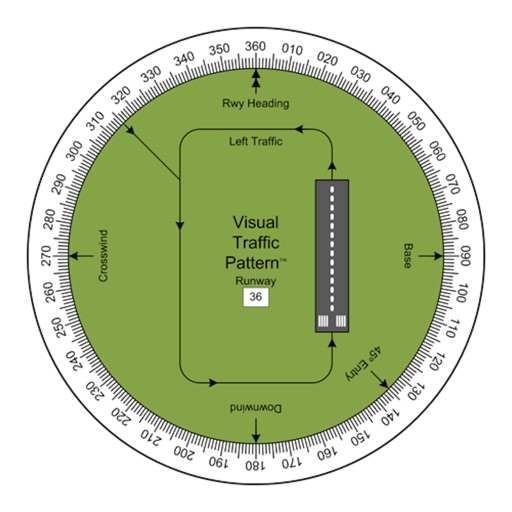
Allows pilots to view runway patterns with finger rotation. Display includes left and right patterns, crosswind, downwind, base, and 45-degree entry headings. Magnetic runway orientation matches aircraft heading for approach visualization.
The app provides flight status, airport maps, and details on restaurants, stores, and services. It offers traffic conditions, travel times, and customized flight alerts including schedule, status, and gate changes.
Book rides using GPS, addresses, or past locations. Rate drivers and save favorites. Pay with cash or multiple payment methods including LINE Pay, credit cards, and e-wallets. Share ride details with contacts.
Generate pure tones, frequencies, and waveforms for and headphone testing. Customize frequency ranges and noise types. Perform audio quality tests and analyze sound output. Save and share test results.